Every version

Newest first. Versions before 0.8.0 ran Access' original plug-in through an emulated driver; 0.8.0 replaced it with TI Revive's own plug-in.

The Control Center works next to your DAW

on macOS and Linux too (it did on Windows): device info, backups and Nerd mode while the plug-in plays. Its window now opens at the right size, it no longer crashes on closing (Linux), and Windows setups from before 0.8.2 get the Access look as well. On macOS the backup works when the Access installer had made Documents/Access Music as administrator: the installer gives the folder back to you.

New in 0.8.20: duplicated tracks. The copy shows "Virus unavailable" again while the original plays (since 0.8.18 it looked usable), and REAPER on Linux no longer crashes when a track with the plug-in is duplicated.

Also in 0.8.20: Linux finds the factory patch libraries in a localized Documents folder (e.g. Dokumente); no dropouts in the first seconds with 4096-sample host blocks; the plug-in shows "No Virus TI can be found" when the TI Revive service is not running; for safety, TI Revive passes only standard read requests to the Virus' USB control endpoint (nothing that could reach its flash). Every package now lists the third-party code it contains (THIRD-PARTY-NOTICES.txt).
Files and full notes

Projects bring back every patch setting

Projects saved the parts in an older format, and the Virus reset about 20 newer settings when it loaded them: Input Mode, unison, arpeggiator mode, chorus type, envelopes 3 and 4 and more. Projects now keep the current format, and older ones are converted when they open. Settings that never reached the Virus in an older project open as the Virus played them. A new project's chorus shows "Classic": that is what the Virus makes of the original's Init patch.

New in 0.8.18: the "No Virus TI can be found" page. Switch the Virus off or pull its cable while the editor is open and it shows the original's page for a missing Virus; it goes away by itself when the Virus is back. Known issue on Linux: after a cable replug, or when the Virus is switched on while no DAW runs, it can come back without sound until it is switched off and on once (E175, next version).

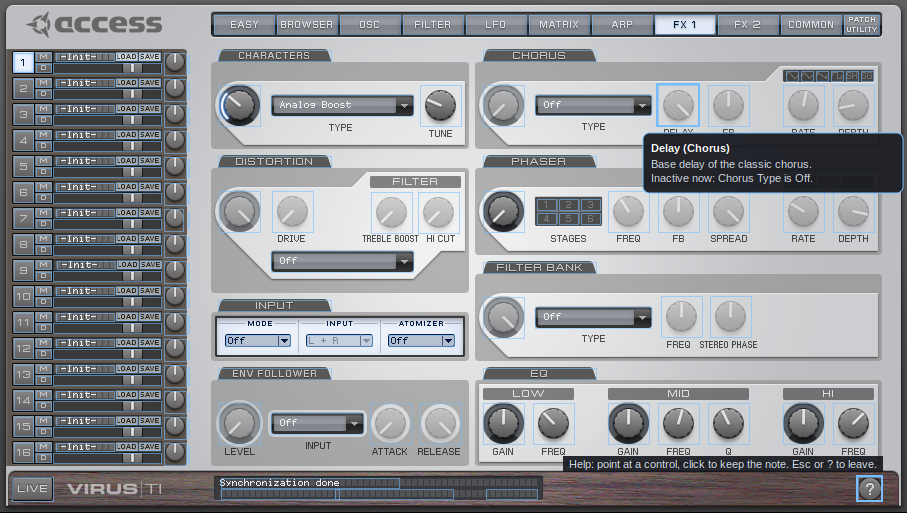
New in 0.8.18: help notes say why a control is greyed out, for example "Inactive now: Chorus Type is Off." or "depends on Input Mode, Input Atomizer."

!A help note on a greyed-out control Help note on a greyed-out control, drawn from your own Access installer. TI Revive is not affiliated with Access Music or Kemper.

Files and full notes

Audio from your DAW through the Virus

Set PATCH UTILITY > Preferences > "Input and Output Configuration" to "3 Outs / 1 Input" and a part's Input Mode (FX 1 page) to Static or Dynamic: the plug-in's sidechain input then goes into the Virus and through that part's filters and effects, as in the original. REAPER: a 4-channel Virus track, the audio sent to channels 3/4. Ableton Live: pick the track in the device's Sidechain section. Tested on Linux (REAPER) and macOS (Ableton Live 12), not yet on a real Windows PC. Known issue: after reopening a project set Input Mode once more. The Audio Unit was tested in Logic Pro for the first time.

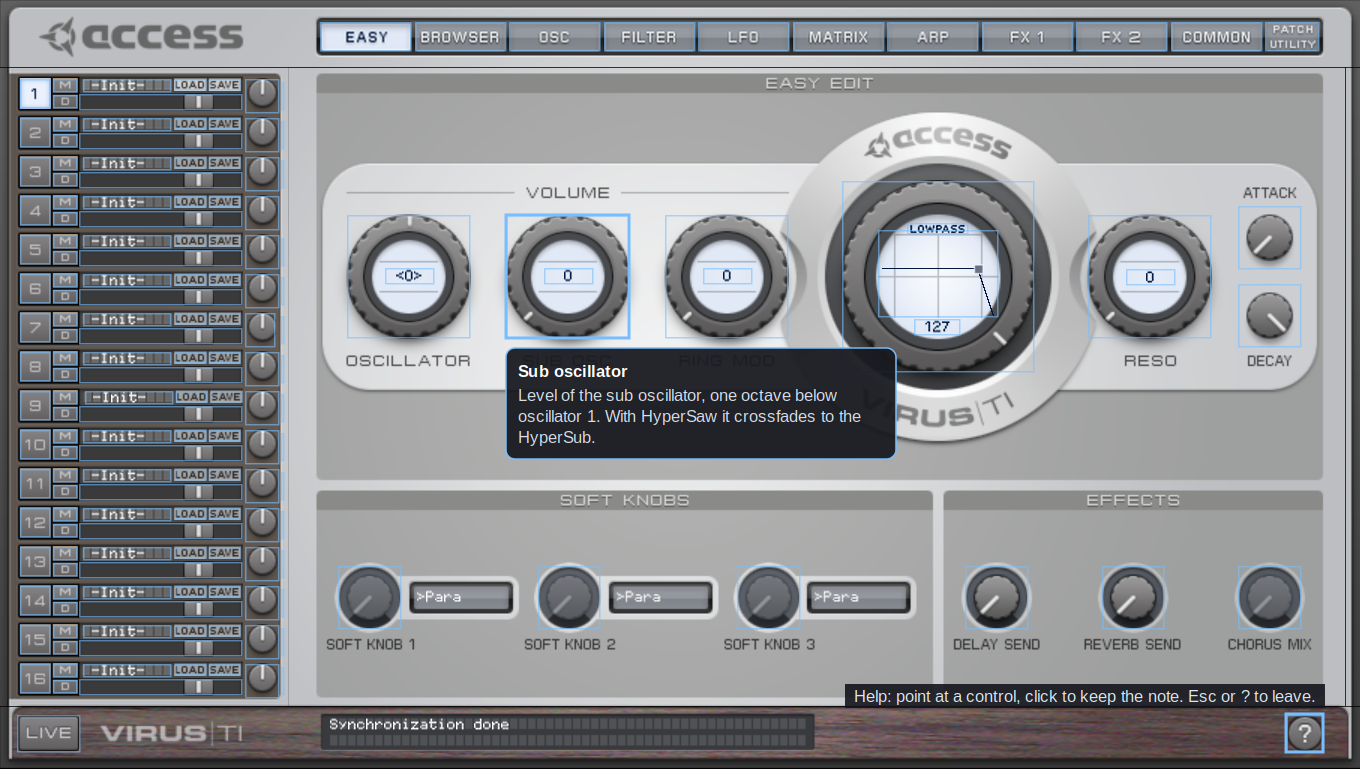
New in 0.8.17: help mode. Click the ? at the bottom right of the editor: every control gets a short note on what it does. Point at a control to read it, click to keep the note on screen; clicks do not change values in this mode, and the page tabs still work. Esc or ? ends it. The notes are written for TI Revive, not taken from the Access manual.

!Help mode: a note explains the sub oscillator knob Help mode, drawn from your own Access installer. TI Revive is not affiliated with Access Music or Kemper.

Files and full notes

Sharper editor on large screens

At 150 or 200 % (right-click the editor, or your display scaling) the plug-in's images are now computed sharper from your own Access files instead of being stretched. Linux: reopening the editor no longer crashes the DAW (since 0.8.0), and the menus open where you click at 150 and 200 %.

Files and full notes

Steadier connection

Switch the Virus off and on (or replug it) while your DAW runs: the plug-in now waits until it is ready and plays in time again. Start your DAW before the Virus is on: the plug-in sends its start-up and your project's sounds as soon as the Virus is there (before they were lost). Windows: two DAWs no longer use the Virus at the same time - the second one shows "Virus unavailable" and takes over when the first one closes. USB 3 now also works in "3 Outs / 1 Input".

Files and full notes

The third USB output

Like the original Virus Control, you can now use USB 3: in the plug-in open PATCH UTILITY > Preferences and set "Input and Output Configuration" to "3 Outs / No Input". Then a part's output can be "USB3 L+R" and its sound comes out of the plug-in's Out 3 - for example for bass, lead and pad on three separate mixer channels in your DAW. The setting is kept for this computer. Thanks for asking (issue #4)!

Files and full notes

Soft knobs on the Virus change the sound

Turning the three soft knobs on the Virus itself now changes the sound (0.8.7 only moved them in the editor). After a preset chosen on the Virus is loaded, your current mod wheel, breath, expression and other controller positions are sent again, like the original Virus Control does.

Files and full notes

Presets and soft knobs on the Virus itself

A preset you choose on the Virus (its display, knobs or buttons) now loads into the plug-in and sounds - before, the part kept its old sound and the plug-in stayed on the old patch. The three soft knobs work in both directions now: in the editor they control the parameter their destination selects (Easy page), and when you turn them on the Virus the plug-in follows. Thanks for the reports (issue #4)!

Files and full notes

Steadier start-up

The plug-in now waits until the Virus has really worked through its start-up messages and your project's sound, instead of a fixed 4 seconds: the first notes play in time, also when a duplicated track takes over the Virus (before, the first notes after the takeover could be up to 2 s late).

Files and full notes

One plug-in instance per Virus, also on Windows

Duplicating a track with the plug-in (e.g. in Ableton) no longer puts the Virus out of time: the copy shows "Virus unavailable" like the original Virus Control, and when you delete the first instance, the copy takes over the Virus and plays in time after a short start-up. Thanks for the report (issue #6)!

Files and full notes

Bigger editor

Right-click an empty spot of the plug-in's editor and choose a size from 100 to 200 %; the choice is kept for new editors. The plug-in also follows the display scaling Windows reports (e.g. 150 %). The Control Center has the same sizes under View > Size. Thanks for the suggestion!

Files and full notes

a DAW's plug-in scan no longer talks to the Virus (it connects only when the plug-in is used); saved projects no longer grow by a few bytes on every save; on a first setup the start page shows how long reading the Virus' banks will take (8-9 minutes once, then seconds). Thanks to the virus-ti-rework project for the findings.

Files and full notes

TI Revive Control Center

  • in the look of Access' Virus Control Center (taken from your

Access installer, like the plug-in's skin): device info, backup of the RAM banks as patch libraries, library conversion (.mid / .syx), and a Nerd mode that shows live what goes between TI Revive and the Virus (decoded, read-only) plus the logs for bug reports. Also as the command line tool tirevive-cc. Firmware / OS updates and flash functions are not supported, on purpose. Linux: the app needs gtkmm 3. Clean-ups: the Linux broker no longer opens a TCP port; the macOS broker no longer runs the MIDI stand-in of the old Access plug-in.

Files and full notes

Native Audio Unit for Logic Pro and GarageBand (the projects of the classic unit open with it); the macOS package holds only the plug-in (VST3 + AU) and the USB service, the Access .pkg is only unpacked.

Files and full notes

TI Revive Virus Control: a plug-in written from scratch that looks and works like the original Virus Control and runs natively on Windows, macOS (Apple Silicon and Intel) and Linux, without Rosetta, Wine or yabridge. Projects of the classic plug-in open with it.

Files and full notes

macOS: "Virus TI not connected" because another driver holds the Virus. Only one driver can use the Virus TI's USB interfaces at a time. If another one is active, TI Revive's plug-in loads but shows "Virus TI not connected" (broker log: claim interface 3: LIBUSB_ERROR_ACCESS). Two common cases are now handled by Install Access Virus TI software.command:

  • Old Access drivers from a full Access installation (Virus TI MIDI Driver.plugin, de.access-music.virus_ti.*, AccessVirusTI.kext) - they cannot work on Apple Silicon, but macOS still runs them. The script offers to disable them (moved to /Library/Application Support/Access Music/Virus TI/Drivers disabled by TI Revive).
  • Aura Plugins' Virus Editor USB driver (AURA Plugins Virus TI USB Midi.plugin). The script offers to park it (moved to /Library/Application Support/Aura driver (parked); move it back to use Aura's editor again).

Restart the Mac afterwards. The broker log now names this situation in plain words.

Updating on macOS: quit your DAW, run the new TI Revive.pkg, then run Install Access Virus TI software.command (with your Access .pkg next to it).

Windows / Linux: unchanged since 0.7.3.

Files and full notes

macOS: works in DAWs running under Rosetta. The plug-in "Virus TI (TI Revive)" (VST3 and Audio Unit) is now a universal binary (Apple Silicon + Intel). So it also loads when your DAW is set to "Open using Rosetta" - many Virus owners set that up for the old Access plug-in, and Cubase then put "Virus TI (TI Revive)" on its blocklist ("Unknown"; the plug-in report shows "CPU: VirtualApple"). If you keep your DAW in Rosetta mode for other Intel-only plug-ins, that is fine now; a native DAW works as well (TI Revive runs the Access plug-in through Rosetta in the background either way).

If Cubase has blocklisted "Virus TI (TI Revive)" before: after updating, open Studio → VST Plug-in Manager, select it in the blocklist and reactivate it (or let Cubase rescan).

Also included from 0.7.2: the Intel-only Access plug-ins are moved out of the DAW plug-in folders (run Install Access Virus TI software.command once after updating), Rosetta 2 check.

Tip: the Virus TI's USB audio runs at 44.1 kHz - use 44.1 kHz projects.

Updating on macOS: quit your DAW, run the new TI Revive.pkg.

Windows / Linux: unchanged since 0.7.2.

Files and full notes

macOS:

  • No more unusable "Virus TI" in your DAW. The original Access plug-ins are Intel-only, so a native DAW listed them as unusable — Cubase even put "Virus TI" on its blocklist, and reactivating it always fails. Install Access Virus TI software.command now moves the Access plug-ins out of the plug-in folders into TI Revive's folder (/Library/Application Support/TI Revive/Access plug-ins), where TI Revive loads them itself. Your DAW only shows "Virus TI (TI Revive)". Uninstall TI Revive.command puts the Access plug-ins back.
  • Rosetta 2 check. The Access install script checks for Rosetta 2 and offers to install it (a DAW starting the plug-in in the background does not get macOS' own Rosetta prompt).
  • Tested additionally with Cubase 15.

Updating on macOS: quit your DAW, run the new TI Revive.pkg, then run Install Access Virus TI software.command once more (with your Access .pkg next to it) so the Access plug-ins are moved. In Cubase, the old blocklist entry disappears after the next scan.

Linux (experimental): smoother audio delivery to the plug-in under Wine (the plug-in no longer waits for Wine's event signalling, which could be delayed).

Windows: unchanged since 0.7.1.

Files and full notes

All platforms: no more hanging notes after a crash. If your DAW crashed or was closed by force while the Virus was playing, notes could keep sounding until you muted the patch. TI Revive now silences the Virus (sustain off + All Notes Off on all channels) as soon as a program that played notes disappears.

Linux (experimental):

  • Recommended audio setup: JACK through PipeWire (tested in REAPER on the built-in sound card): sudo apt install pipewire-jack, set PipeWire to 44.1 kHz / 512 (pw-metadata -n settings 0 clock.force-rate 44100 and ... clock.force-quantum 512, or permanently - see README-linux.txt), start the DAW with pw-jack. ALSA directly works too. Do not use PulseAudio in the DAW: its irregular block sizes make the Virus report timing errors (messy sound, hanging notes).
  • Timing measured over 80 s in REAPER: no drift, jitter 0.06 ms.
  • install.sh now warns when the official yabridge 5.1.1 is used with Wine 9.22 or newer (the plug-in window would not react to mouse clicks; use a newer yabridge build), and hides the original "Virus TI" plug-in from yabridge.
  • Quit your DAW normally: the plug-in saves the synced Virus memory only on a clean exit; killing it (e.g. Ctrl+C in a terminal) means another sync next time.

Updating: Windows - run the new setup.exe or .msi; macOS - run the new TI Revive.pkg; Linux - unpack and run ./install.sh again (your Access software in Wine is kept).

Virus TI Snow owners: please run the attached tirevive-usbinfo.ps1 and attach its result to issue #3.

Files and full notes

pre-release

Linux (new, experimental). TI Revive now also runs on Linux: your own Access Virus TI plug-in (Windows version) runs in a native Linux DAW through Wine and yabridge, and TI Revive's broker talks to the Virus over USB — patch sync, MIDI, the Virus' USB audio and the editor. Tested with REAPER 7.82 on Ubuntu 26.04 (GNOME, Wayland) and Wine 10.0; timing measured sample-accurate. Download TI-Revive-0.7.0-linux.tar.gz, run ./install.sh "/path/to/Virus TI Software Suite 5.1.7.00 64-bit.msi", see README-linux.txt.

  • You need Wine and yabridge newer than 5.1.1: the 5.1.1 release ignores mouse clicks in plug-in windows with Wine 9.22 and newer (yabridge issue #409); use a build from yabridge's "Automated builds" until a new release is out.
  • The first start syncs the Virus' memory once (about 7 minutes).
  • While TI Revive uses the Virus, Linux cannot use it as a sound card; it is handed back automatically afterwards.
  • Use ALSA or JACK in your DAW, not PulseAudio: PulseAudio hands the plug-in irregular block sizes, the Virus then reports timing errors, playback sounds messy and notes can hang. With PipeWire, pipewire-jack (JACK) at 44.1 kHz works for the built-in sound card.
  • Quit your DAW normally: the plug-in saves the synced Virus memory only on a clean exit; killing the DAW (e.g. Ctrl+C in a terminal) means another full sync next time.

Windows: setup.exe. Besides the .msi there is now TI-Revive-0.7.0-setup.exe — the same installer in a setup program, for PCs where opening an .msi does not work. Put your Access .msi next to it as before. Use one or the other.

Virus TI Snow owners: please help. TI Revive may not find a Snow yet (Access' driver knows a second USB product ID that TI Revive does not handle yet). Please run the attached tirevive-usbinfo.ps1 with the Snow connected (right-click → Run with PowerShell; it only reads USB information) and attach the TI-Revive-usbinfo.txt from your Desktop to a GitHub issue.

Also included: 0.6.3 (the connected Virus' own model is reported), 0.6.2 / 0.6.1 (macOS Audio Unit timing, one program at a time).

macOS: unchanged since 0.6.3. Windows: plug-in unchanged since 0.6.3.

Files and full notes

pre-release

(Windows and macOS)

  • Fix: Virus TI Snow. TI Revive reported every Virus to the Access software as a regular "Virus TI", so the Virus TI Snow plug-in did not find a Snow, and the regular Virus TI plug-in started syncing and then stopped with "not responding to requests" at the end of its (longer) bank list. TI Revive now passes on the connected Virus' own model (product name and version), so the Snow is recognised as a Snow — use the Virus TI Snow plug-in with it. Nothing changes for Virus TI / TI2 Desktop, Polar and Keyboard.
  • Includes everything from 0.6.2 (macOS Audio Unit timing) and 0.6.1 (one program at a time uses the Virus).

Updating: quit your DAW, then run the new TI-Revive-0.6.3.msi (Windows) or TI Revive.pkg from TI-Revive-0.6.3-mac.zip (macOS).

Snow owners: please let us know in an issue whether it connects and syncs — we could only test with a TI2 Desktop.

Files and full notes

pre-release

(macOS)

  • Audio Unit timing in GarageBand / Logic restored. 0.6.0/0.6.1 split larger host buffers into 512-sample pieces to avoid the original plug-in's "buffer size too high" message; that made playback in GarageBand feel less tight. The Audio Unit now hands the host's buffers to the original unchanged again. The original may show its buffer-size message once — click it away; playback stays in sync.
  • Includes 0.6.1: one program at a time uses the Virus.

Updating: quit your DAW and run the new TI Revive.pkg. The VST3 (Ableton etc.) is unchanged.

Windows: unchanged since 0.4.2.

Files and full notes

pre-release

(macOS)

  • Fix: the Virus could go silent while another program started TI Revive. If a second program used the Virus at the same time — Logic or GarageBand checking the Audio Unit (auval), a second DAW, or a DAW plus GarageBand — it restarted the Virus' USB audio in the middle of the running session, and the Virus stayed silent until it was switched off and on. Now, as with the original Access driver, one program at a time uses the Virus; any other program shows "no Virus TI connected" until the first one is closed, then takes over automatically.
  • Installing an update no longer stops a running session; the new version is used from the next start.

If your Virus stayed silent with 0.6.0: switch the Virus off and on once, then update.

Updating from 0.6.0: quit your DAW and run the new TI Revive.pkg.

Windows: unchanged since 0.4.2.

Files and full notes

pre-release

Audio Unit for Logic Pro and GarageBand (macOS, beta)

  • New: "Virus TI (TI Revive)" as an Audio Unit in addition to the VST3, so GarageBand and Logic Pro can use the Virus TI on Apple Silicon. Same engine as the VST3: your original Access plug-in runs in a helper under Rosetta, your DAW runs natively. In GarageBand: Smart Controls → Plug-ins → Audio Units → TI Revive → Virus TI (TI Revive).
  • Passes Apple's Audio Unit validation (auval) without warnings; tested in GarageBand on a MacBook Air M3. Logic Pro uses the same Audio Unit but has not been tested yet — reports welcome.
  • The Audio Unit lists the original's ~2700 automatable parameters (its unused automation slots are left out), saves and restores its state with your project, and shows the complete Access editor.
  • Larger host buffers are handled automatically (the original only accepts 64-512 samples; no more "buffer size too high").

Updating from 0.5.0: run the new TI Revive.pkg (quit your DAW first); the Access plug-ins stay as they are.

Windows: unchanged since 0.4.2.

Files and full notes

pre-release

MacOS on Apple Silicon (first Mac release, beta)

  • TI Revive now runs on Macs with Apple Silicon (M1 and newer, macOS 14.4+). The Access kernel driver can never load there and the Access plug-ins are Intel-only; TI Revive's native plug-in "Virus TI (TI Revive)" runs your original Access plug-in in a helper under Rosetta 2, so your DAW runs natively.
  • Full Total Integration as on Windows: connection, memory/bank sync, MIDI, the Virus audio through the plug-in track, and the complete Access editor inside your DAW (knobs, tabs, menus, renaming and storing patches; your computer MIDI keyboard keeps working).
  • No Access drivers at all: TI Revive replaces Access' driver library, talks to the Virus over USB with a small on-demand service, and takes the audio from macOS' own USB audio driver.
  • Unplugging and replugging the Virus is detected; after loading the plug-in the sound starts after about 5 seconds.
  • Tested with Ableton Live 12 on a MacBook Air M3 (macOS 26).

Mac install: download TI-Revive-0.5.0-mac.zip, run TI Revive.pkg (not signed: right-click > Open, or System Settings > Privacy & Security > Open Anyway), then put your own Access "Virus TI Software Suite" .pkg next to Install Access Virus TI software.command and double-click it (installs your unmodified Access plug-ins without the old driver packages; skip if already installed). Allow your DAW to use the microphone when macOS asks: macOS gives the Virus' audio only to apps with that permission. Details in README-mac.txt.

Known limits on the Mac: VST3 only (no AU yet); one plug-in instance per synth (as on Windows); Virus Control Center (32-bit) does not run on current macOS.

Windows: unchanged since 0.4.2 (same features; updating from 0.4.x is optional).

Files and full notes

pre-release
  • Fixes the plug-in hang of 0.4.1 (0.4.1 was withdrawn): the Virus TI plug-in froze when the DAW opened it. Cause: a settings redirect added for the ASIO control panel also hooked the plug-in's own registry calls and ended up calling itself. The redirect now only affects the original Access ASIO driver, as intended.
  • Includes the 0.4.1 improvement: the ASIO control panel lists the Virus TI and keeps its settings (stored per user).
  • Test build process: every plug-in build is now loaded and initialised by a test host before release.

Updating from 0.4.0: install over it, nothing else needed.

Files and full notes

  • The Virus TI as a sound card again (ASIO). New ASIO device "Virus TI (TI Revive)": play your DAW through the Virus outputs and record its analog inputs, at 44.1 kHz with a 256-sample buffer - the same channels (2 in / 2 out) and buffer as the original Access ASIO driver. It wraps your original Access ASIO driver (VirusUSB_X64.dll from your Access software) with TI Revive's driver emulation, like the plug-in.
  • In your DAW choose "Virus TI (TI Revive)", not the Access "Virus USB ASIO driver" entry.
  • Keep the Virus "USB Audio mode" (Patch Utility -> Config) at 2 outs / no input - that is the sound card mode.
  • The Virus audio is now streamed by the TI Revive bridge and shared between the plug-in and the ASIO driver (both follow the synth's clock, like with the original driver). Audio reaches the plug-in more evenly (max ~11 ms between deliveries instead of ~27 ms).
  • The Virus TI plug-in works as before and at the same time as the ASIO device.

Tested: Windows 10 VM with Ableton Live 11 (plug-in + ASIO device together), and a real Windows 11 PC: ASIO playback through the Virus clean and responsive. Note: in a virtual machine the audio to the Virus can crackle - that comes from the VM's USB passthrough, not from TI Revive.

Updating from 0.3.x: install over it, nothing else needed.

Files and full notes

  • No more background process at logon. The TI Revive bridge (vtibroker.exe) is no longer started when you log in to Windows. The plug-in or Virus Control Center starts it when they need the Virus, and it closes by itself 30 seconds after the last of them has gone.
  • Updating from 0.3.0 stops a running bridge and removes the old logon entry automatically.
  • Everything else as in 0.3.0 (Virus audio on WinUSB like the original Access driver, no sync drift).

Tested: update 0.3.0 -> 0.3.1 in the Windows 11 VM; Ableton Live 11 in the Windows 10 VM (bridge started with the plug-in, closed 30 s after Ableton).

Files and full notes

  • Virus audio now runs like with the original Access driver. TI Revive streams the Virus' USB audio itself on WinUSB instead of going through the Windows sound card driver. The synth's clock is the master again: the plug-in counts exactly the samples the synth sends, so its MIDI timestamps can no longer drift away from the synth.
  • Fixes the sync errors that came back after about 25 minutes of playback, and the audible "catch-up" when the plug-in re-anchored.
  • USB hiccups (a busy PC) are measured by USB frame number and filled with exactly that much silence, so they do not shift the timing.
  • A/B against the original driver (same project, Win10 VM): level, spectrum and timing match (envelope correlation 0.98, level within 0.3 dB, timing within a few ms).
  • The Virus is no Windows sound card any more: "Line (Virus TI)" / "Speakers (Virus TI)" disappear from Windows. You hear the Virus through the plug-in track, as before.
  • Updating from 0.2.x: unplug and replug the Virus (or restart Windows) once after installing, so the audio part of the Virus switches to the new driver binding.
  • "A sync error occurred" can still show once right after the first Play; Stop and Play clears it.

Tested in the Windows 10 VM with Ableton Live 11, including a direct comparison with the original Access driver, and in a long session on a real Windows 11 PC with memory integrity (HVCI) on: no sync errors, no drift.

Files and full notes

pre-release
  • Sync fix: the plug-in no longer shows "A sync error occurred. Press Stop and Play to clear." on playback. The synth needs a continuous audio stream to it (the Access driver always sent one); TI Revive now streams silence to the Virus playback device. Measured: synth sync reports from ~9 per second down to occasional ones during dense playback, none shown in the plug-in.
  • Includes the 0.2.1 timing fix (exclusive 44.1 kHz audio, no drift).
  • Do not select "Line (Virus TI)" or "Speakers (Virus TI)" as an audio device in your DAW or in Windows: the plug-in needs both exclusively.

Files and full notes

pre-release
  • Timing fix: notes and tempo-synced sounds no longer drift against the DAW. Windows' own USB audio driver ran the Virus at 48 kHz while the plug-in times notes at 44.1 kHz, so notes came ~9 % early with periodic resyncs. TI Revive now opens the Virus audio exclusively at 44.1 kHz. Measured (16ths at 120 BPM, buffer 2048): v0.2.0 -30 000 ppm / 26 ms jitter, v0.2.1 -1 ppm / 0.27 ms jitter.
  • Do not select "Virus TI" as your DAW's audio device: the plug-in needs exclusive access to it (otherwise it falls back to shared mode with the old timing).

Files and full notes

pre-release

First public release: Windows 10/11 x64 installer for the original Access plug-in without the old kernel driver.

Files and full notes