TI Revive

Like meeting an old best friend again.

Total Integration for the Access Virus TI on Windows 11, macOS and Linux, without the old drivers. Its plug-in looks and works like the original Virus Control: every parameter, the preset browser, automation, and the synth's audio over the same USB cable.

Download 0.8.20 What's new

Free · open source · VST3 and Audio Unit · released 17 Oct 2026

☕ Free, and it will stay free. Every change is tested on the real synth on Windows, macOS and Linux, often back and forth between the three, and that takes a lot of evenings. If TI Revive gives your Virus a second life and you'd like to say thanks, you can buy me a coffee. It is entirely optional; every feature works the same either way. A test report or a kind word helps just as much.
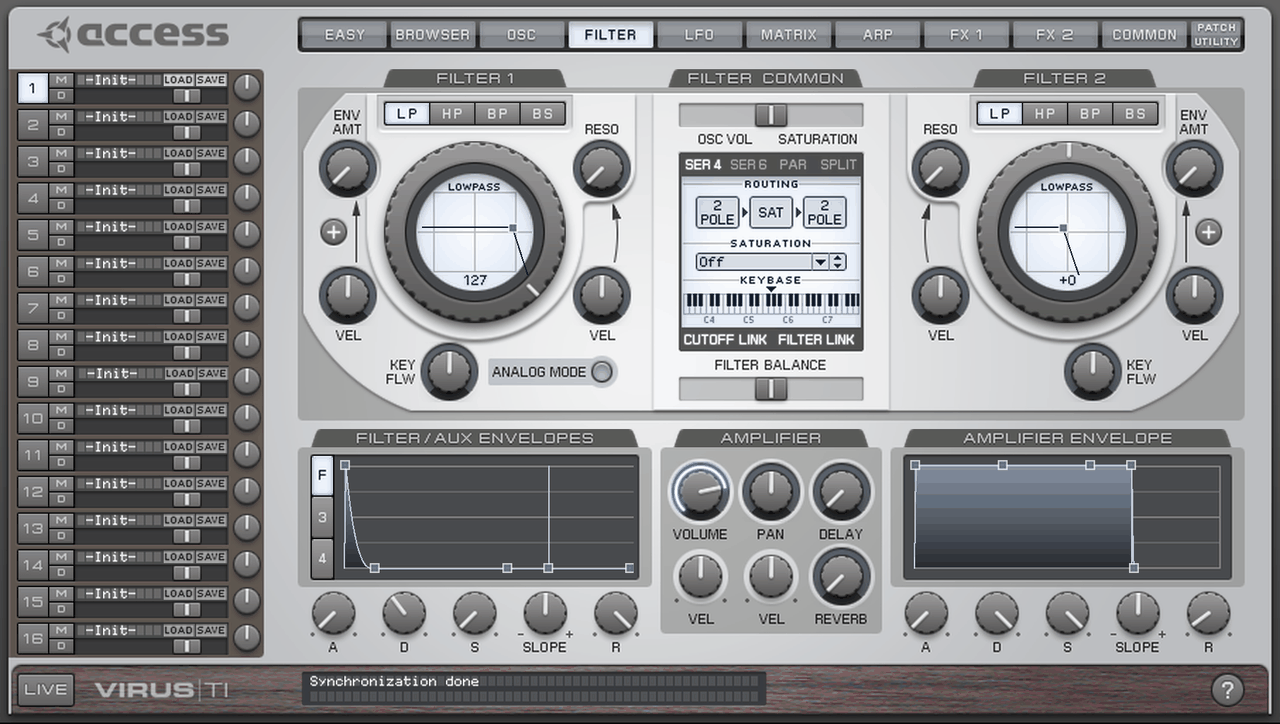
TI Revive Virus Control, the plug-in's filter page, drawn from the user's own Access files
TI Revive is not affiliated with Access Music or Kemper and contains no Access files.

Problems in the original Access plug-in

Did the original Access plug-in, Virus Control, the one that came with the Virus TI, have problems for you? TI Revive rebuilds that plug-in, and we want to fix its problems instead of copying them.

Already fixed

  • In our timing test the original plug-in played the first note late and dropped the second. TI Revive puts all 256 notes on the grid.
  • While it starts up or syncs banks, the original plug-in drops the notes you play and sends “All Notes Off”. TI Revive holds the notes back at start-up and pauses its bank sync while you play.

What to report

Hanging notes, sync errors, crashes, projects that did not open, the preset browser, automation, timing. If you only remember it roughly, say so.

Report a problem in the original plug-in Reports so far

Version 0.8.20, released 17 Oct 2026

You also need your own Access “Virus TI Software Suite” installer (e.g. 5.1.7). Access offers it on its download page; you need an account there to download it. TI Revive unpacks only what the plug-in reads from it: the skin, the parameter descriptions, the ROM banks. Older versions are on GitHub.

Windows

Windows 11 x64, also Windows 10

Download 4.0 MB

TI-Revive-0.8.20-setup.exe

or TI-Revive-0.8.20.msi (3.8 MB)

How to install
  1. Put the setup file next to your Access “Virus TI Software Suite” 64-bit .msi.
  2. Run it. It is not code-signed: More info › Run anyway. Your Access installer is only unpacked, not installed.
  3. Connect the Virus, rescan plug-ins in your DAW and load TI Revive Virus Control. The ASIO device TI Revive Virus Audio makes the Virus a sound card.
SHA-256 6f437e3167e7dd1488fc2ea3052afd5cd9a65ba201469b564c1a48989429c50d

macOS

macOS 14.4 or newer, Apple Silicon and Intel

Download 5.3 MB

TI-Revive-0.8.20-mac.zip

How to install
  1. Unpack the zip and open TI Revive.pkg (not signed: right-click › Open).
  2. Put your Access .pkg next to Set up Access Virus TI files.command and run it. It also parks old drivers that would block the Virus.
  3. Start your DAW and allow microphone access when asked: macOS gives the audio of the Virus only to apps with it. VST3 and Audio Unit.
SHA-256 90879aea0f06e5c050ecb2aa2c74694cc59d5bc4bc5fd75f66eca72dbcd14e14

Linux

x86_64 with systemd, Ubuntu 22.04 / Debian 12 or newer

Download 2.6 MB

TI-Revive-0.8.20-linux.tar.gz

How to install
  1. sudo apt install msitools to unpack the Access installer.
  2. Unpack and run ./install.sh "/path/to/Virus TI Software Suite 64-bit.msi"; it asks for your password once (udev rule).
  3. For steady audio join the real-time group (sudo usermod -aG pipewire $USER, log out and in), then rescan plug-ins.
SHA-256 b995bc4e4582076c80cf968c3b78c3fa2a4b400e84e2c104104f211e83bc74b0
SynthVirus TI and TI2: Desktop, Polar, Keyboard, and the TI Snow
DAWAny VST3 host; Audio Unit for Logic and GarageBand
OutputsUSB 1 and 2, USB 3 if you switch it on in PATCH UTILITY › Preferences
Not includedFirmware or OS updates for the Virus, or anything else that writes its flash. On purpose.

How it works

The plug-in talks to the Virus directly over USB, so there is no MIDI port to set up and no Access driver left on your system.

Install TI Revive

One installer per system. It sets up the USB access and puts the plug-in where your DAW looks for it.

Point it at your Access installer

The setup unpacks the skin, the parameter descriptions and the ROM banks from the installer you own. No Access files come with TI Revive.

Load the plug-in

TI Revive Virus Control on a MIDI track. Projects made with the original plug-in open with it. The first start reads RAM A–D from the Virus once, which takes a few minutes; you can play meanwhile.

Features

What TI Revive does, and what we measured on our own Virus TI2 Desktop. The raw numbers and how they were taken are in the repository (evidence, development log).

The plug-in

TI Revive Virus Control is written from scratch and looks and works like the original Access plug-in, Virus Control. It draws its look from your own Access installer at runtime.

  • All 16 parts, every parameter, the preset browser, RAM and ROM banks, patch libraries.
  • Projects made with the original plug-in open with it; the saved state is byte for byte the same.
  • Presets and soft knobs chosen on the Virus itself are followed, as in the original.
  • Three stereo outputs over USB, plus the analog outputs of the Virus.
  • Audio from your DAW through the filters and effects of the Virus (sidechain input), as in the original.
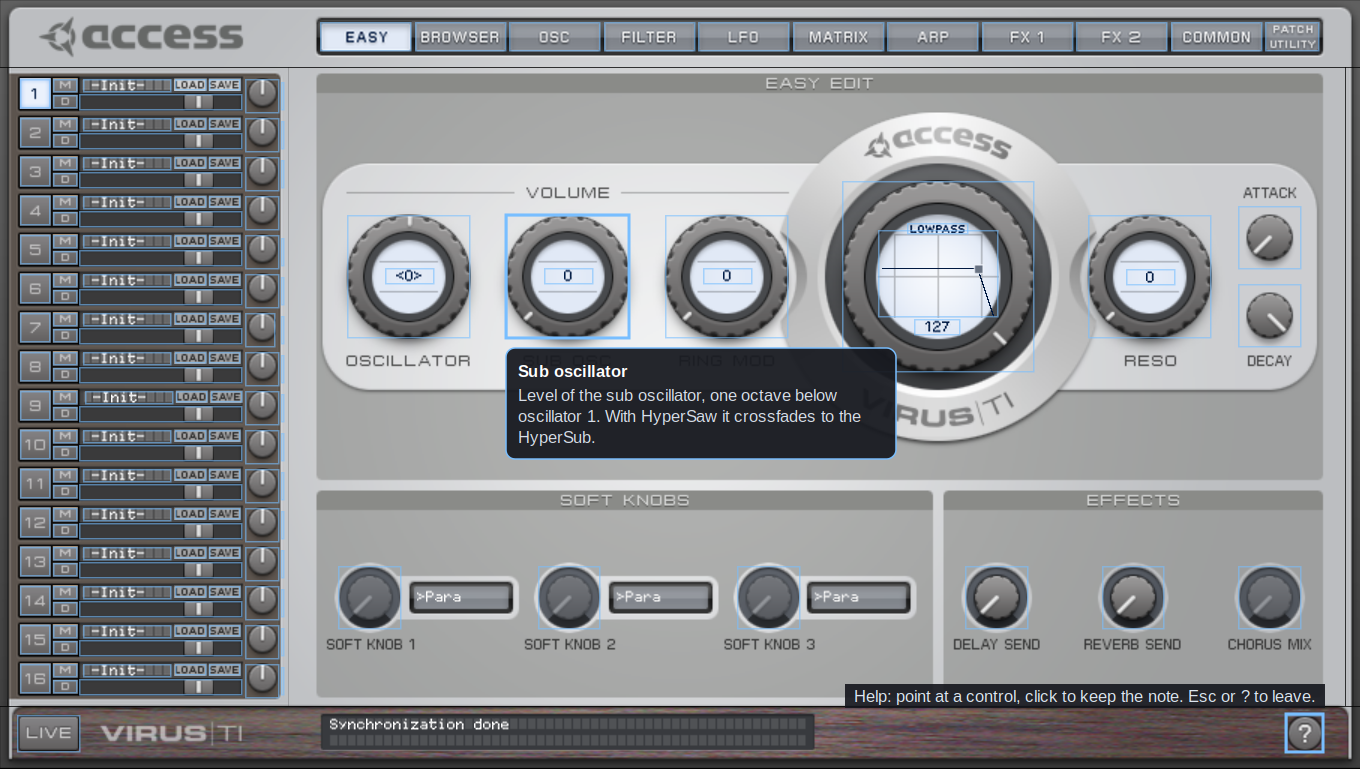
  • A help mode: the ? button explains every control, and why a greyed-out one is inactive.
  • Projects bring back every patch setting of all 16 parts.
  • VST3 on Windows, macOS and Linux; Audio Unit for Logic and GarageBand. Native on Apple Silicon.
  • Editor sizes from 100 to 200 %. On larger sizes and Retina screens each image is enlarged once with a sharp filter, in memory only.

Help mode

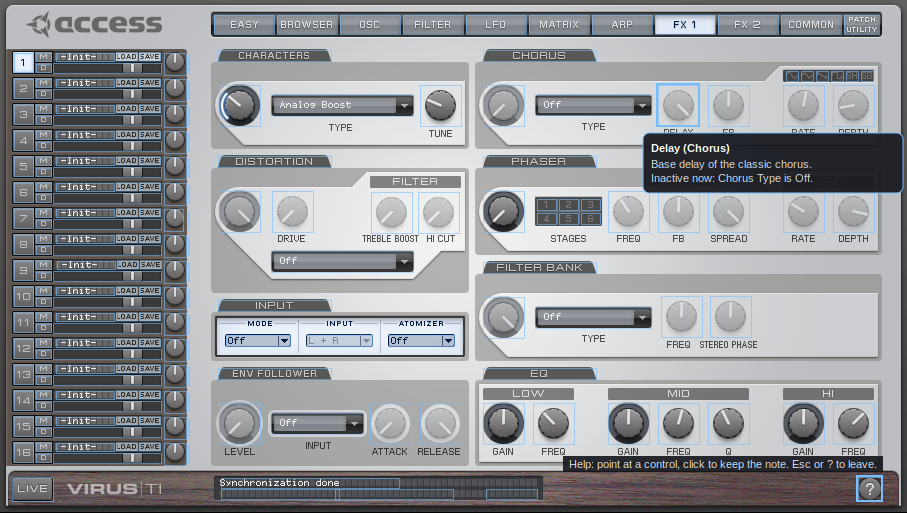
Click the ? at the bottom right of the editor: every control gets a short note on what it does. Point at a control to read it, click to keep the note on screen; clicks do not change values in this mode, and the page tabs still work. Esc or ? ends it. The notes are written for TI Revive, not taken from the Access manual. A greyed-out control says why, for example “Inactive now: Chorus Type is Off.” or “depends on Input Mode, Input Atomizer.”

The plug-in's help mode: a note explains the sub oscillator knob
Help mode, drawn from your own Access installer. TI Revive is not affiliated with Access Music or Kemper.
A help note on the greyed-out chorus delay knob: Inactive now, Chorus Type is Off
Help note on a greyed-out control, drawn from your own Access installer. TI Revive is not affiliated with Access Music or Kemper.

Timing

The plug-in finds the clock of the Virus on USB, stamps every note against it and reports its latency, so the DAW lines recordings up with the grid. Any host sample rate works: a resampler converts to the 44.1 kHz of the Virus with -90 dB error.

16th notes at 120 BPMOn the gridJitterDrift
Linux, REAPER256 / 2560.01 ms0 ppm
macOS, Ableton 12 (M3)256 / 2560.02 ms0 ppm
Windows 11, Ableton Live224 / 2240.24 ms2 ppm
Classic plug-in 0.7.xfirst late, second missing0.06 msn/a

Recorded from the USB audio of the Virus and measured by onset analysis. Jitter is the standard deviation.

CPU and audio thread

The audio thread never allocates memory or waits for a lock; note-offs always get a slot, so no note hangs.

Before (0.7.x)Now
Idle, Virus connected5 %1.4 %
Stress test: 16 channels of notes + 32 automated parameters19 %2.9 %
One audio block, 3 LFOs automating the Virus for 40 minn/amax 122 µs, 0 dropouts

Checked with ThreadSanitizer and AddressSanitizer; 140 unit tests run with every release build on Windows and Linux.

Editor speed

Only the controls that change are redrawn, the backgrounds of recent pages are cached, and on Linux the images live on the X server.

BeforeNow
Full repaint on Linux~70 ms1–7 ms
One knob step~5 ms< 1 ms
First visit of a page27–52 ms10–13 ms

Problems found on the hardware

Behaviour of the Virus that is not documented anywhere, found by testing.

  • A flood of parameter changes can hang the audio of the Virus until it is switched off. Automation is limited to 250 messages per second and merged per parameter; a 4-minute full-load test passes.
  • The Virus drops the message right after a multi dump. The plug-in pauses after one, so new projects reset the synth reliably.
  • Bank sync requests make the Virus play its notes late. The sync pauses while you play and continues in the gaps.
  • Switch the Virus off and on, or replug it, while the DAW runs: the editor shows the original's “No Virus TI can be found” page meanwhile, then the plug-in waits until the Virus is ready and plays in time again. Two DAWs share it: one plays, the other waits and takes over. Linux: after a cable replug, or when the Virus is switched on while no DAW runs, it can come back without sound; switch it off and on once while the DAW runs (being worked on).

TI Revive Control Center

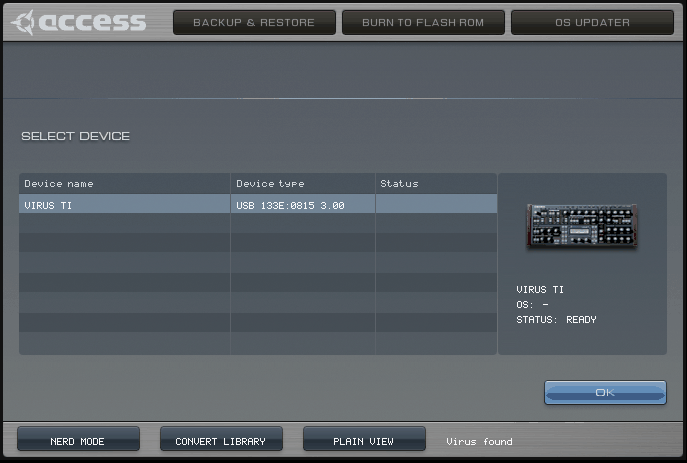
A separate app in the look of the Access Virus Control Center, when that is in your Access installer. It shows the connected Virus and its RAM banks, backs them up as patch libraries and converts libraries between .mid and .syx. It only reads from the Virus.

TI Revive Control Center in the look of Access' Virus Control Center
The Control Center in the Access look, drawn from your own installer. The Burn To Flash ROM and OS Updater pages are only kept for the look: they say that TI Revive does not offer these functions. TI Revive is not affiliated with Access Music or Kemper.

Nerd mode

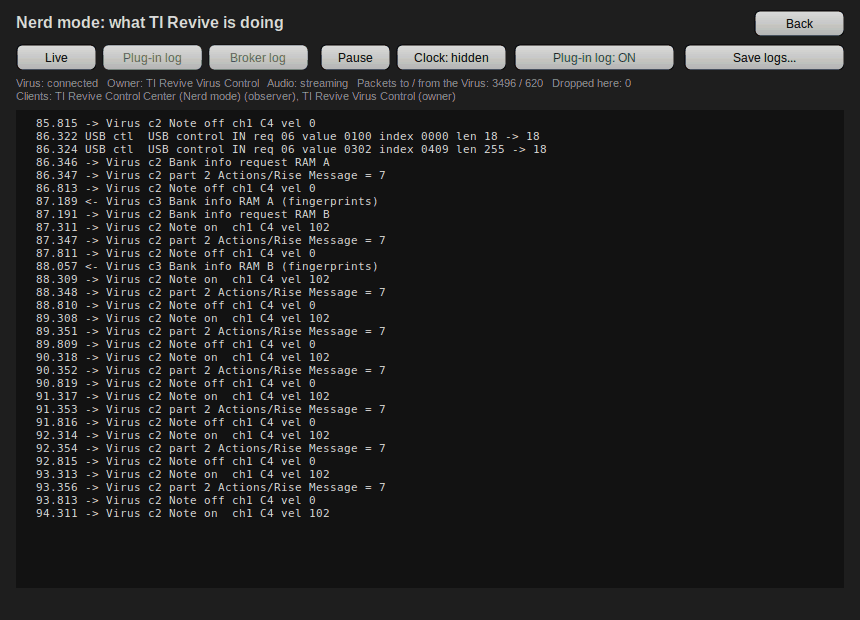
Shows live what goes between TI Revive and the Virus, decoded: notes, parameter changes by name, dumps, the bank sync. It lists which programs use the Virus, shows the plug-in's and the broker's logs, and saves them all for a bug report in one file. It only watches; it never sends anything to the Virus.

Nerd mode: the plug-in plays notes and checks its bank cache, decoded live
The plug-in plays notes and checks its bank cache, decoded live.

What TI Revive will not do

On purpose.

  • No firmware or OS updates for the Virus, no “Burn To Flash”, no factory reset. Anything that writes to the flash memory of the Virus can brick it.
  • No Access files in TI Revive: the skin, the parameter descriptions and the ROM banks come from the installer you own.
  • No telemetry: TI Revive never connects to the internet. Its parts talk to each other on your computer only, and the logs stay there.

What is tested where

We test on a Virus TI2 Desktop. For other models, systems and DAWs we depend on test reports from their owners.

ModelWindowsmacOSLinux
TI2 Desktoptestedtestedtested
TI Snowno report yetworks for users no report yet
Desktop (TI1), Polar, Keyboardno report yetno report yet no report yet
  • The installers are not signed, so Windows and macOS ask once before they run them.

Automated tests

140 unit tests run with every release build on Windows and Linux. They cover 94 % of the lines of the core library: the USB protocol, the device access, the editor and the reader for the Access files (measured 16 Oct 2026).

On the synth

Changes that touch the Virus are tried on our TI2 Desktop before a release; the release notes say on which systems and in which DAWs.

Your reports

The soft knobs (0.8.7, 0.8.8) and the third USB output (0.8.9) were fixed after a user's report. Bug reports and test reports from other setups show us what to fix next.

Recent releases

The Control Center works next to your DAW

  • on macOS and Linux too (it did on Windows): device info, backups and Nerd mode while the plug-in plays. Its window now opens at the right size, it no longer crashes on closing (Linux), and Windows setups from before ...

Projects bring back every patch setting

  • Projects saved the parts in an older format, and the Virus reset about 20 newer settings when it loaded them: Input Mode, unison, arpeggiator mode, chorus type, envelopes 3 and 4 and more. Projects now keep the ...

Audio from your DAW through the Virus

  • Set PATCH UTILITY > Preferences > "Input and Output Configuration" to "3 Outs / 1 Input" and a part's Input Mode (FX 1 page) to Static or Dynamic: the plug-in's sidechain input then goes into the Virus and through ...

Every version Release feed (Atom) On GitHub: Watch › Custom › Releases

Help and support

“Virus TI not connected”

Only one driver can use the USB interfaces of the Virus. Old Access drivers, or third-party ones like the driver of another Virus editor, take them first. Disable the other driver and restart; on macOS the setup script offers to park the known ones.

Connected, but no sound

The Virus decides per part where its sound goes. Switch the part's output to “Out 1” and back to “USB 1” in the plug-in to send the setting again. On macOS also check that your DAW may use the microphone.

Three separate outputs (USB 3)

PATCH UTILITY › Preferences › “Input and Output Configuration” = “3 Outs / No Input”. Then a part's output can be “USB3 L+R” and its sound comes out of the plug-in's Out 3. In Ableton: an audio track with Audio From = the Virus track, Out 3, Monitor In.

Process audio through the Virus (sidechain input)

Like the original, the plug-in can send audio from your DAW into the Virus: set “Input and Output Configuration” to “3 Outs / 1 Input”, and on the FX 1 page set a part's Input Mode to Static (always on) or Dynamic (played with notes) and Select to L + R. Then send an audio track to the plug-in's sidechain input; the part's filters and effects process it. In REAPER, give the Virus track 4 channels and send the audio to channels 3/4 (check in the pin connector that they feed Sidechain 1/2). In Ableton Live, pick the audio track in the device's Sidechain section. In this mode the Virus does not work as a sound card for your computer. Tested on Linux (REAPER), macOS (Ableton Live 12) and Windows 11 (Ableton Live, in a VM and on a real PC).

Projects bring back every patch setting

Older versions saved the parts in a format the Virus converts itself, and it reset about 20 newer settings on loading: Input Mode, unison, arpeggiator mode, chorus type, envelopes 3 and 4 and more. Projects now keep the current format (0.8.18); older projects are converted when they open, and settings that never reached the Virus open as the Virus played them. A new project's chorus shows “Classic”: that is what the Virus makes of the original's Init patch.

When the Virus is missing

Switched off or unplugged, the editor shows the original's “No Virus TI can be found” page and the page tabs are locked, as in the original. The page goes away by itself when the Virus is back. Do not follow its advice to hold ARP EDIT while switching the Virus on; TI Revive does not need that.

The first notes after Play are late

The plug-in sends notes slightly ahead to make up for the USB round trip, so start playback a little before the first note. The original driver did the same.

Report a problem

If your question is not answered above, open a report on GitHub. Reports are read by the developer, and the answer comes in the same thread; it is a hobby project, so it can take a day or two.

  1. Collect the logs. Easiest: open the TI Revive Control Center, switch on Nerd mode and press the Save logs... button. You get the plug-in and broker logs in one file, without your home folder or user name. Or by hand: create an empty file diag.on in the plug-in's folder, reproduce the problem, and take diag.log from the same folder:
    Windows%LOCALAPPDATA%\virus-ti-native macOS~/Library/Application Support/virus-ti-native Linux~/.local/share/virus-ti-native
  2. Open a bug report. The form asks for your system, Virus model, the TI Revive and DAW versions, and what happened. Drag the log files into it.
  3. Everything works? A test report helps as much as a bug report, above all for the Snow, Polar and Keyboard, and DAWs we have not tried.

You need a free GitHub account to post. Look through the logs before you attach them and remove anything you consider private. Existing reports: all issues.

Contributing

The repository is prepared for working on it with an AI coding assistant.

For AI assistants

AGENTS.md gives any assistant the rules and a map of the repository: no Access material in the code, never risk the synth, evidence before claims, and say exactly what was tested.

Skills

Step-by-step guides in .claude/skills: test your setup safely and write a report, find the cause of a problem in the logs, and prepare a pull request the way we review it. They are plain text, so they work without an assistant too.

Without code

Test reports, reports about problems in the original, and help with reading someone's logs are as useful as pull requests.

How to contribute Open the repository

Why

The Access drivers stopped working on current systems. TI Revive is free and open source.

How it was built

By working out the USB protocol and the original software's behaviour from logs, captures and analysis, and by testing on real hardware. Much of the work was done with an AI coding assistant; the tests on the synth are done by hand.