TI Revive

TI Revive

Like meeting an old best friend again.

The Access Virus TI on Windows 11, macOS and Linux, without the old drivers. Its plug-in works like the original Virus Control: every parameter, the preset browser, automation, and the synth's audio over the same USB cable. Its look comes from your own Access installer.

Download 0.8.43 What's new

Free · open source · VST3 and Audio Unit · released 21 Nov 2026

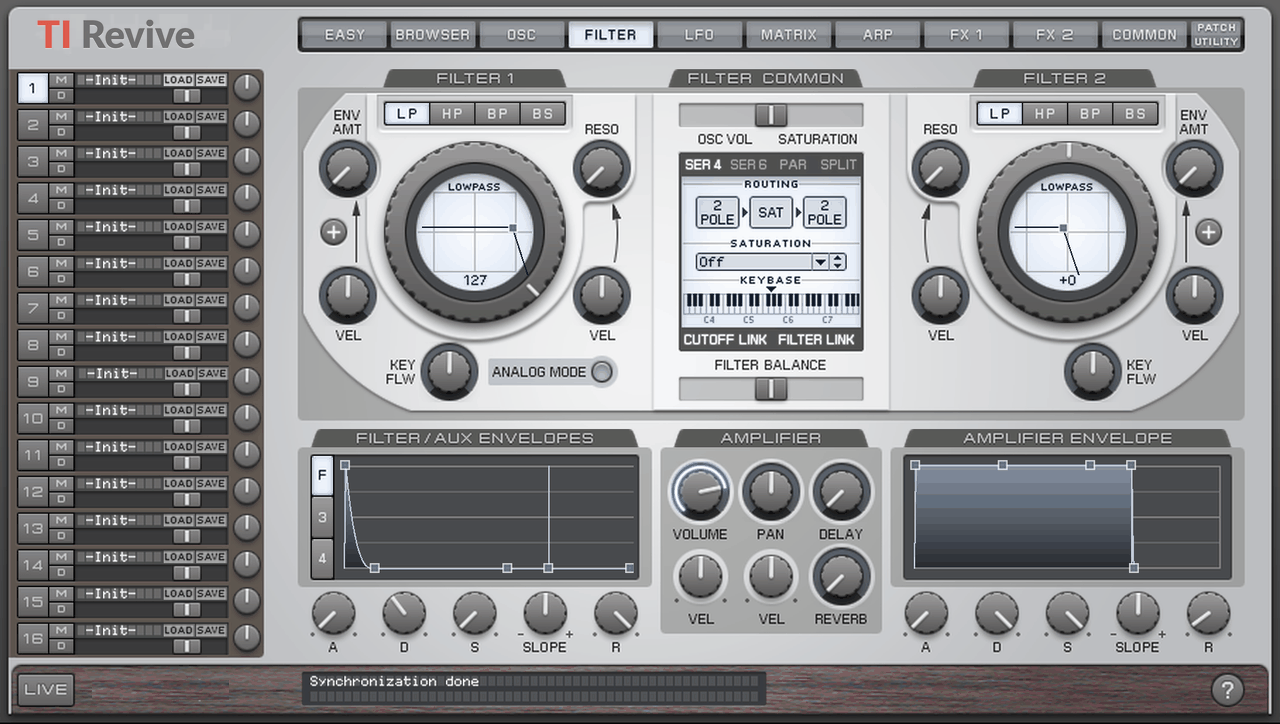
TI Revive, the plug-in's filter page, drawn from the user's own Access files
The look is Access' own: TI Revive draws it at runtime from the skin in your own Access installer. TI Revive ships no Access files: no skin graphics, no logos, no Access code, no patch banks; in these pictures the TI Revive name replaces Access' logos. Not affiliated with Access Music or Kemper.

☕ Free, and it will stay free. Changes that touch the Virus are tested on the real synth, on the systems the release notes name, often back and forth between the three, and that takes a lot of evenings. If TI Revive gives your Virus a second life and you'd like to say thanks, you can buy me a coffee. It is entirely optional; every feature works the same either way. A test report or a kind word helps just as much.

Problems in the original Access plug-in

Did the original Access plug-in, Virus Control, the one that came with the Virus TI, have problems for you? TI Revive rebuilds that plug-in, and we want to fix its problems instead of copying them.

Already fixed

  • In our timing test the original plug-in played the first note late and dropped the second. TI Revive puts all 256 notes on the grid.
  • While it starts up or syncs banks, the original plug-in drops the notes you play and sends “All Notes Off”. TI Revive holds the notes back at start-up and pauses its bank sync while you play.
  • Owners reported drifting notes and sync errors over USB (Gearspace, Ableton forum). TI Revive stamps every note on the Virus' own clock and reports its latency to the DAW: in our tests every note lands on the grid, within 0.01 to 0.33 ms (standard deviation). The delay itself remains, as in the original: 3584 samples plus the buffer, at 48 kHz 76, 80 and 85 ms at buffers of 64, 256 and 512 samples, at 44.1 kHz 83, 87 and 93 ms (since 0.8.39, measured on Linux; before, it never went below the delay of a 256 buffer). The DAW lines up what it plays from the timeline. Notes you play live skip the delay in DAWs that mark played notes (Ableton Live), about 22 ms (since 0.8.39); Logic's Audio Unit marks none, so there they are heard with the delay. A played note that a clip note of the same key would cut waits for it.
  • The original cannot export or freeze a Virus track faster than real time and shows a warning that offline rendering is not supported (KVR, Zynewave forum). TI Revive notices an offline render and runs it at the pace of the Virus, so the export sounds right; it takes as long as the song.
  • A reopened project could play a different patch than the one it showed (Gearspace). Since 0.8.18 TI Revive's projects bring back every patch setting.
  • Delay compensation worked with the original only on a track insert, not on an aux bus (Sagan Metro forum). In our test the plug-in on a track fed by a send (REAPER) puts every note on the grid.
  • Access' software stopped working on new macOS from Sierra on (Synthtopia), and Windows 11 blocks its old USB driver. TI Revive runs natively on Windows 11, macOS (Apple Silicon and Intel; Intel since 0.8.39, not tested on an Intel Mac yet) and Linux.
  • Sleep: on the Mac, sleep cut the original's connection until Access fixed it in 2008 (KVR). Since 0.8.24 the plug-in sets the Virus up again after the computer wakes, also after a short USB drop at wake (tested with a drop of under a second on Linux). In our tests on Windows 11, macOS and Linux the Virus played again after waking. Once, on Linux, the Virus stayed silent after waking because it kept the wrong sample rate; since 0.8.26 the plug-in keeps it quiet then, and since 0.8.32 it switches the rate away and back, which the Virus cannot ignore. On the Mac, macOS can leave the Virus' audio with gaps after a sleep; since 0.8.39 the plug-in then reconnects the Virus by itself, like a replug, at most once a minute (two good wakes on our Virus). If dropouts remain after waking, unplug and replug the Virus.

The same as in the original

  • One plug-in instance per Virus (Ableton forum): it controls all 16 parts. A second instance shows “Virus unavailable” and takes over when the first one is removed.
  • The Virus follows the project's sample rate (44.1 or 48 kHz) and shows “Audio clock changed” when it switches (since 0.8.32).
  • Owners advised a USB port directly on the computer instead of a hub (Gearspace). We have not tested hubs. A user's Polar works through a USB-C hub; with two Viruses behind one hub the second stayed silent until both were in the computer's own ports (issue #50).

What to report

Hanging notes, sync errors, crashes, projects that did not open, the preset browser, automation, timing. If you only remember it roughly, say so. One we could not test: Cubase on Windows opening a project while the Virus is switched on, where the original crashed (Steinberg forum).

Report a problem in the original plug-in Reports so far

Version 0.8.43, released 21 Nov 2026

You also need your own Access “Virus TI Software Suite” installer (e.g. 5.1.7). Access offers it on its download page; you need an account there to download it. TI Revive unpacks only what the plug-in reads from it: the skin, the parameter descriptions, the ROM banks. Older versions are on GitHub.

Windows

Windows 11 x64, also Windows 10

Download 4.5 MB

TI-Revive-0.8.43-setup.exe

or TI-Revive-0.8.43.msi (4.3 MB)

How to install
  1. Put the setup file next to your Access “Virus TI Software Suite” 64-bit .msi. Also when updating from 0.8.32 or older: TI Revive now reads only the 64-bit Virus Control.dll, and the setup replaces the 32-bit one older setups could copy.
  2. Run it. It is not code-signed: More info › Run anyway. Your Access installer is only unpacked, not installed. Since 0.8.38 the installer really removes the Access driver packages, so the original Access software no longer works on that PC until you reinstall it. Unplug and replug the Virus after installing.
  3. Connect the Virus, rescan plug-ins in your DAW and load TI Revive. The ASIO device TI Revive Audio makes the Virus a sound card.
SHA-256 0aaddf347826263c37068b9ca1b578d8768086a82d633860a0487e390b358ac0

macOS

macOS 14.4 or newer, Apple Silicon and Intel (Intel since 0.8.39, not tested on an Intel Mac yet). For Intel Macs on macOS 13 Ventura there is a test package (TI-Revive-<version>-mac-ventura.zip) and for macOS 10.15 Catalina one with its own USB audio service (-mac-libusb.zip); neither is tested by us.

Download 9.3 MB

TI-Revive-0.8.43-mac.zip

How to install
  1. Unpack the zip and open TI Revive.pkg (not signed: right-click › Open).
  2. Put your Access .pkg next to Set up Access Virus TI files.command and run it. It also parks old drivers that would block the Virus.
  3. Start your DAW and allow microphone access when asked: macOS gives the audio of the Virus only to apps with it. VST3 and Audio Unit.
SHA-256 0edf140703c1a68d54c3a50cb99f2b9bfe19e500cf4fe84502d9be13d695e321

Linux

x86_64 with systemd, Ubuntu 22.04 / Debian 12 or newer

Download 3.1 MB

TI-Revive-0.8.43-linux.tar.gz

How to install
  1. sudo apt install msitools to unpack the Access installer.
  2. Unpack and run ./install.sh "/path/to/Virus TI Software Suite 64-bit.msi"; it asks for your password once (udev rule).
  3. For steady audio join the real-time group (sudo usermod -aG pipewire $USER, log out and in), then rescan plug-ins.
  4. The Control Center window needs gtkmm 3 (Ubuntu 24.04+ libgtkmm-3.0-1t64, Fedora gtkmm3.0, Arch/CachyOS gtkmm3); install.sh names what is missing.
SHA-256 825049fdb1885d1565bcb5bba1c848f07e2896cb8d1cece56a6c1f6d9e6178e8

Preview: 0.8.44-rc9 for testers

A test version of the next release is out for anyone who wants to help test it. Please test with a disposable DAW project and tell us what you find with the Test report template. What works helps us as much as what doesn't, especially on setups we can't test ourselves (the TI Snow, Polar and Keyboard, Intel Macs, Windows 10, DAWs other than Ableton, REAPER, Logic and GarageBand). On Windows, uninstall the preview before installing the final 0.8.44. The regular download stays 0.8.43 until then.

Download the preview Test report

Downloaded 3,602 times so far (all versions, counted by GitHub).

SynthVirus TI and TI2: Desktop, Polar, Keyboard, and the TI Snow
DAWVST3 hosts; Audio Unit for Logic and GarageBand. Tested by us: Ableton Live, REAPER, Logic Pro, GarageBand
OutputsUSB 1 and 2, USB 3 if you switch it on in PATCH UTILITY › Preferences
Not includedFirmware or OS updates for the Virus, or anything else that writes its flash. On purpose.

How it works

The plug-in talks to the Virus directly over USB, so the plug-in needs no MIDI port and no Access driver.

Install TI Revive

One installer per system. It sets up the USB access and puts the plug-in where your DAW looks for it.

Point it at your Access installer

The setup unpacks the skin, the parameter descriptions and the ROM banks from the installer you own. No Access files come with TI Revive.

Load the plug-in

TI Revive on a MIDI track. Projects made with the original plug-in (VST3) open with it. The first start reads RAM A–D from the Virus once, which takes a few minutes; you can play meanwhile. New names since 0.8.43: the plug-in is “TI Revive” (before “TI Revive Virus Control”), the ASIO driver “TI Revive Audio” and the MIDI inputs “TI Revive Synth” and “TI Revive MIDI” (before “Virus TI Synth” and “Virus TI MIDI”). Projects saved with the old name open with it (same plug-in ID). If a track used one of the MIDI inputs, choose it there once more.

Features

What TI Revive does, and what we measured on our own Virus TI2 Desktop. The raw numbers and how they were taken are in the repository (evidence, development log).

The plug-in

TI Revive is written from scratch and works like the original Access plug-in, Virus Control. It takes its look from your own Access installer at runtime.

What it covers

  • All 16 parts, every parameter, the preset browser, RAM and ROM banks, patch libraries.
  • Several Viruses at once (since 0.8.42, issue #45: each Virus gets its own TI Revive service, numbered by the USB port it is plugged into (Virus 1, Virus 2, ...), and each plug-in instance takes a free Virus: the one its project was saved with when that one is free, as the original did. Their MIDI inputs carry the number ("TI Revive 2 Synth"). On Windows the ASIO driver plays Virus 1 only. With one Virus nothing changes: a second instance waits as before. Tested on Linux with our TI2 and a simulated TI2 as the second. On macOS a user plays two TI2s in Logic (issue #50): behind one USB hub the second stayed silent, in the Mac's own ports both play. Since 0.8.43 the browser and the menus show which Virus an instance plays ("- Virus 2"). Not yet tested with two Viruses on Windows.).
  • VST3 on Windows, macOS and Linux; Audio Unit for Logic and GarageBand. Native on Apple Silicon and Intel Macs (Intel since 0.8.39, not tested on an Intel Mac yet).

Projects and export

  • Projects made with the original plug-in's VST3 version open with it (since 0.8.25: the plug-in list also shows it as "TI Revive (original projects)", which has the original's plug-in ID; tested in Ableton Live 11 and 12, also a Windows project on the Mac); the saved state is byte for byte the same. Projects with the original's VST2 version do not open: TI Revive is VST3 only.
  • Projects bring back every patch setting of all 16 parts.
  • Export, freeze and offline bounce work without a real-time render setting or a live recording: the plug-in renders at the pace of the Virus. The original refused offline renders.

Patches and libraries

  • The LOAD menu has the original's "Revert to" (back to the patch before the last load, edits included) and "Recently Used" (the last 10 patches of each part); "Create Empty Library" is in the SAVE menu's Personal Libraries, as in the original (since 0.8.25; until 0.8.28 also in LOAD and the browser). Since 0.8.35 the LOAD menu also has "Init Patch" (our own addition): the init patch from your Access installer, to start a sound from scratch; "Revert to" brings the previous sound back.
  • Browser drag and drop like the original (since 0.8.29): drag one or several patches (Shift = range, Ctrl = single entries) from a library onto a RAM slot in the other pane, or drag a part's patch name onto a RAM slot; within one RAM bank a drag swaps the patches; Alt+click renames a RAM patch; right-click "Undo last operation" toggles the last change. Program +/- on the Virus then reaches those patches (it only steps through the Virus' own banks, in the original too). Personal libraries work the same way (copy into them, swap, rename, "Delete selection", "Sort alphabetically"), and patches keep their positions with gaps like in the original. A RAM bank's right-click menu has "Download entire bank from Virus TI" (reads all 128 again, about 2 minutes, progress on the LCD) and "Sort alphabetically" (writes only the slots that change; like the original, it cannot be undone).
  • Your own ROM banks (since 0.8.37, issue #22): if you burned your own banks into the Virus' ROM slots with the original Control Center, TI Revive reads those banks from the Virus instead of taking the factory banks from your Access installer, like the original. The Virus marks these banks itself. TI Revive reads each of them once, patch by patch (about 2 minutes per bank, progress on the LCD, notes still play), and keeps them for that Virus; it reads them again when the Virus' record of them changes. Until a bank is read, a patch chosen from it on the Virus is left alone instead of being replaced by the factory sound. Tested with a TI2 Desktop with factory ROMs and a bank marked by hand on Linux (REAPER), Windows 11 (VM, Ableton Live 11) and macOS (Ableton Live 12); on Linux the patches read from the Virus were byte for byte those of the Access installer. Works for a user with a TI2 Polar whose ROM A-Z hold their own banks and a TI2 Desktop with their own banks in ROM A-L (macOS, Logic Pro): their names in the browser, their sounds on the Virus.
  • Arrow keys in the browser (since 0.8.37, issue #23, our own addition): click a patch in a browser list, then Up and Down step to the next or previous patch, Left and Right to the next or previous column, and load it into the selected part. Holding a key runs through the list, and the patch it stops on is loaded. Up and Down tested on Linux (REAPER), Windows 11 (VM, Ableton Live 11) and macOS (Ableton Live 12), and by a user on macOS (Logic Pro); Left and Right on Linux (REAPER) and by a user on macOS.
  • Patch libraries from the original's three places, each its own menu (since 0.8.29): Personal Libraries (your Documents folder), User Libraries and Public Libraries. On the Mac the factory libraries that Access installs in /Library/Application Support appear under Public Libraries. On Linux only Personal Libraries. To add a library, drop its .mid or .syx file from Explorer, Finder or your file manager onto the browser (since 0.8.35, our own addition: the original takes no file drops). It is copied into Access Music/Virus TI/Patches in your Documents folder, never over an existing file, and the browser shows it at once; a .syx is saved as a .mid so the original finds it too. Copying the file into that folder yourself works as well; it shows up the next time the plug-in is loaded. Damaged patches in a library (dumps of the wrong length) are left out, as in the original; since 0.8.35 the plug-in's log names the library and how many.
  • RAM backup. Before TI Revive writes patches into the Virus' RAM banks (SAVE, a drop, swap, rename or sort in the browser, Undo last operation), it saves the patches that would be overwritten in a library of the day, "RAM Backup 2026-10-31" in Personal Libraries (since 0.8.36, our own addition). To get a patch back, drag it from that library onto a RAM slot. If the backup cannot be written, nothing is written to the Virus. The backup knows what the plug-in's bank cache knows: a patch you stored on the Virus itself since the last sync is not in it. Tested on Linux with a TI2 Desktop: the backup and the drag back restored the slot byte for byte; the backup and the restore also on Windows 11 (VM, Ableton Live 11) and macOS (Ableton Live 12).

On the Virus and in the DAW

  • Presets, soft knobs and the part selected on the Virus itself are followed, as in the original (the part since 0.8.33).
  • Knobs you turn on the Virus reach your DAW like the plug-in's own knobs while the plug-in window is open (since 0.8.29, issue #10): Ableton Live's Configure mode adds them and automation records them. Tested in Ableton Live 11 (Windows 11, VM), Ableton Live 12 (macOS) and REAPER (Linux).
  • Three stereo outputs over USB, plus the analog outputs of the Virus. Parts on the analog outputs stay in time with the USB parts: like the original, the Virus holds them back by the USB latency (since 0.8.33).
  • Audio from your DAW through the filters and effects of the Virus (sidechain input), as in the original.
  • The REMOTE page (since 0.8.22): the Virus' remote templates with their names, knob names and MIDI strings, the original's knob template list, template files to load and save, sent to the Virus like the original.
  • The original's sync error message, shown when the Virus reports late notes while your DAW plays.
  • Scrambled audio restarts by itself (since 0.8.41): in about one start in 250 the Virus sends its audio scrambled for a whole session (crackle, notes off time); the plug-in notices it and restarts the Virus' audio once, on Linux, Windows and macOS. A switch on the Control Center's Options page. Since 0.8.43 it also catches it in silence, within a few seconds after the start, before your first note (checked on recordings of real scrambled streams, not yet on the Virus).
  • When the Virus stops sending audio (since 0.8.41): the plug-in tells you to switch the Virus off and on; in our tests only that helped.
  • The arpeggiator follows a count-in (since 0.8.41, issue #30): like with the original, the Virus' arpeggiator and clock-synced LFOs run in time with the bar when your DAW counts in before recording.
  • A Keyboard or Polar plays its own keys again after the DAW closes (since 0.8.41): TI Revive lets the Virus go when the last plug-in or the Control Center closes, as the original's driver does, and links it again for the next one. Checked on a simulated Keyboard. On Linux the kernel's USB audio driver can link it again (see the limits).
  • The keys of a Keyboard or Polar on macOS (since 0.8.38): TI Revive offers a MIDI input “TI Revive Synth” while the plug-in or the Control Center is open. Choose it as the MIDI input of the track and arm it. Not tested by us: our TI2 Desktop has no keys. By user reports: notes, pitch bend and mod wheel recorded on a TI1 Keyboard (Ableton Live 12.3.7) and a TI2 Polar.
  • The Virus’ MIDI In on macOS (since 0.8.41): a second MIDI input “TI Revive MIDI”, as the Access driver had. While the Virus works with a plug-in it sends what arrives at its MIDI In socket only to the computer, so a keyboard plugged in there reaches the DAW only through this input: choose it as the MIDI input of the track with the plug-in and arm it. It shows up on our Mac (0.8.41 test round); we had no keyboard at the Virus' MIDI In to play through it.
  • Windows MIDI ports (since 0.8.42): on Windows 11 25H2 or later, once Windows has Windows MIDI Services built in (it comes with the Windows update from the end of November 2026), TI Revive offers the MIDI inputs “TI Revive Synth” (the keys, wheels and pedals of a Keyboard or Polar) and “TI Revive MIDI” (what arrives at the Virus’ MIDI In), as the Access driver did. Virus to DAW only. The installer adds them only on a Windows that supports them: on Windows 10 and older Windows 11 there are none, as before. Tested in a Windows 11 VM with Microsoft’s preview package and messages fed in by hand; not yet with Windows’ own copy or with a Virus that has keys.
  • The keys of a Keyboard or Polar and the Virus’ MIDI In on Linux (since 0.8.42): the MIDI inputs “TI Revive Synth” and “TI Revive MIDI” in the ALSA sequencer, numbered as the Linux kernel’s own driver had them. Choose them as the MIDI input of the track with the plug-in and arm it, as on macOS. They exist while the plug-in or the Control Center is open. Virus to DAW only. They show up on our TI2 Desktop; no note has been played through them yet (it has no keys).
  • Setup Tips for Your DAW in the ? menu (since 0.8.38): opens by itself the first time for a DAW and for a point not read before. Seen on Linux (REAPER), macOS (Ableton Live, Logic) and Windows 11 (Ableton Live).
  • In Logic, Plug-in Latency Compensation must be on. With it off, TI Revive and a Logic instrument played about 100 ms apart; with it on they were in sync by ear, and an export measured at most 0.42 ms apart. Logic warns when you turn it off.
  • The Virus leaves remote mode when the plug-in closes, as with the original (since 0.8.38). Tested on Linux with a TI2 Desktop; the effect on a Virus with keys is not tested.
  • One bad reply no longer ends a bank sync (since 0.8.38): a bank info of the wrong size or a dump that does not match it is asked for again, up to 3 times. The retry is covered by unit tests; on our TI2 Desktop only the normal sync has run with it.
  • Linux: notes no longer get later in long sessions (since 0.8.38). From clock drift, the broker added 30 ms about every 22 minutes on our TI2, and notes stayed late until the plug-in restarted. Measured with the fix past that point. Linux only: macOS and Windows take their timing from the device, by reading the code.
  • A crash when the plug-in closes just as the Virus connects is fixed (since 0.8.38): 3 hits before, 25 of 25 clean after, on Linux.
  • The numbers 100 to 127 in the browser no longer touch the names (since 0.8.38, issue #28).
  • The D button (direct monitoring) works (since 0.8.39): the part plays straight on Out 1. Tested on macOS (Ableton Live).
  • Panic and the editor's own messages reach the Virus at once, also while notes are played (since 0.8.39). Tested on macOS (Ableton Live).
  • macOS: a saved project no longer switches the Virus' audio clock at start (since 0.8.39), so “Audio clock changed” no longer shows twice. Tested in Ableton Live.
  • Linux: no click at the start of playback when the broker stays running (since 0.8.39): the broker mutes the first audio packet of a stream. Checked on Linux with a TI2 Desktop, 10 of 10 starts clean.
  • Windows: library and template files with names outside Windows' old code page (Japanese or Cyrillic on a Western Windows, accents copied from a Mac, emoji) no longer crash the plug-in when it starts (since 0.8.40, issue #35), and the menus show their names correctly. Reproduced and checked on Windows 10 in Steinberg's VST3PluginTestHost; not yet tested with a Virus connected.

In the editor

  • The LCD shows the control under the mouse (since 0.8.34), as in the original: its name, its value, the value stored in the patch in brackets, and the part.
  • A help mode: the ? menu's Explain the Controls explains every control, and why a greyed-out one is inactive.
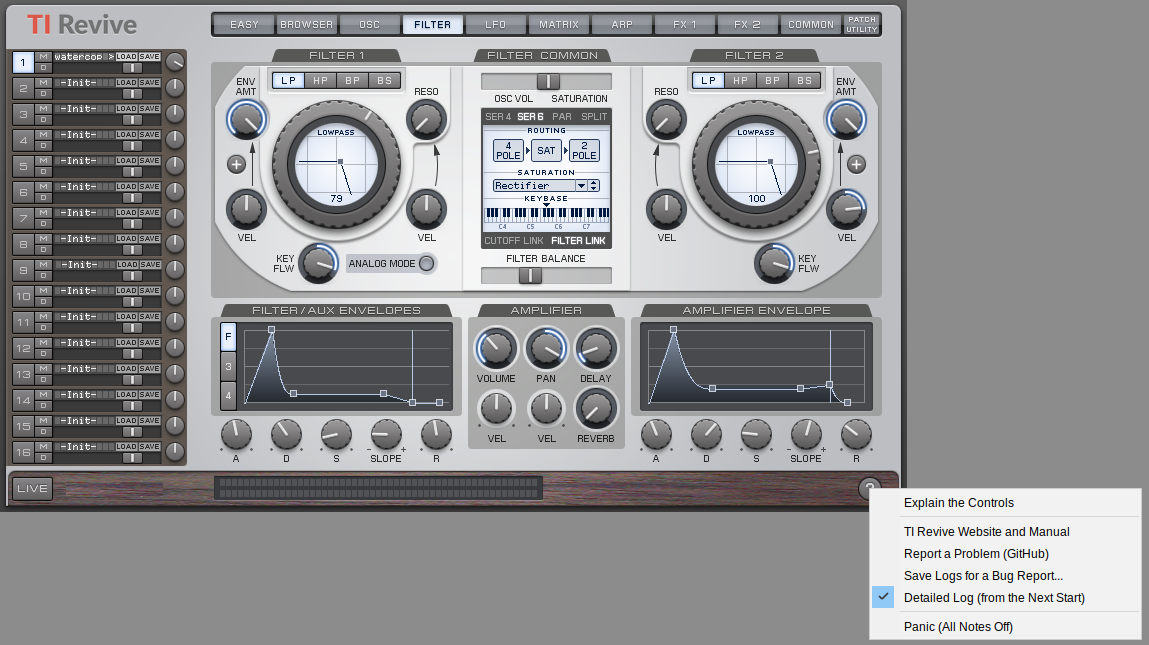
  • The ? menu. Since 0.8.36 the ? at the bottom right opens a menu: Explain the Controls (the help mode above), Setup Tips for Your DAW (since 0.8.38), the Access manuals (since 0.8.39: Reference, Quickstart, Atomizer and the tutorials, opened from your own Access installation, as the original's menu lists them; a Snow gets its own manuals), the Welcome page and What's New in TI Revive (since 0.8.39), the TI Revive website, Report a Problem (the GitHub issues), Prepare a Bug Report (since 0.8.42; before: Save Logs for a Bug Report): one text file with the system, the versions and the ends of the plug-in and broker logs, home folder and user name replaced, then GitHub's bug form opens with the version filled in and you attach the file there; nothing is sent by TI Revive. Since 0.8.42 also Download TI Revive (version), when the opt-in update check found a newer release (see Options). Then the detailed log for the next start, and Panic, which sends sustain off and all notes off on all 16 channels.
  • The original's start-up page, “Starting up” with its filling ring, while a project opens; “Syncing memory with Virus” only when the plug-in really reads banks from the Virus (since 0.8.27). Since 0.8.39 “Starting up” goes straight to “Syncing memory with Virus” when banks have to be read, without the editor in between, as in the original. Then a Welcome page after a new install, or What's New after an update, in the original's style (since 0.8.39, also in the ? menu).
  • Editor sizes from 100 to 200 %. On larger sizes and Retina screens each image is enlarged once with a sharp filter, in memory only.

Menus, reworked

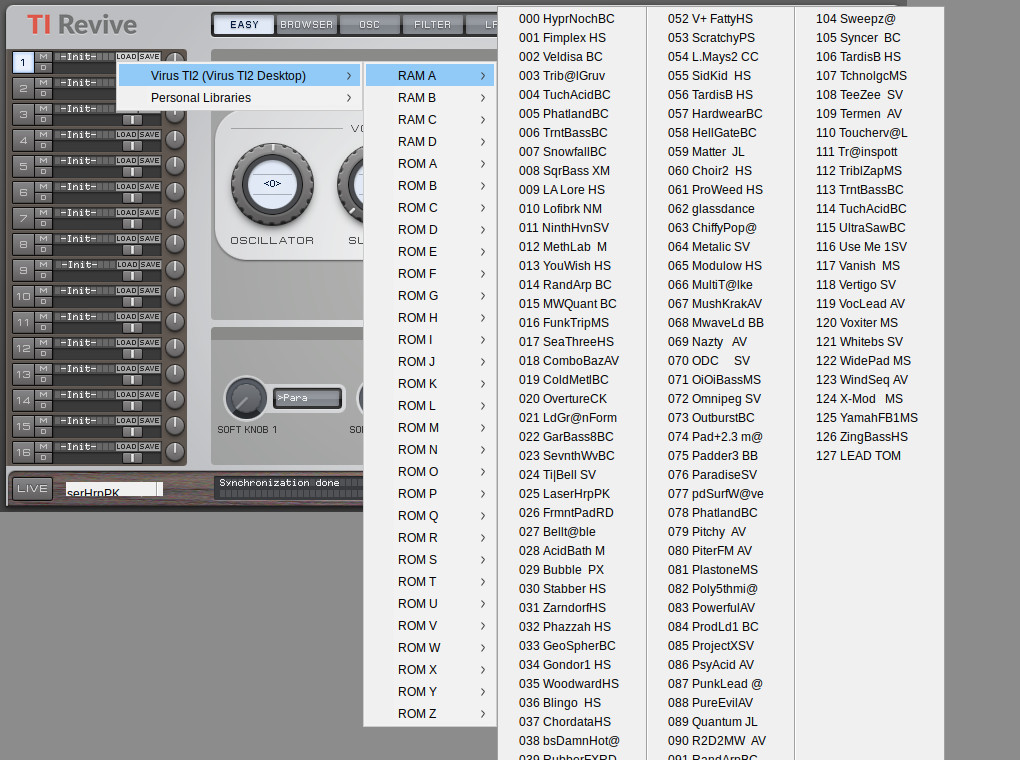
Since 0.8.22 the plug-in's menus are reworked and modernized, and they work the same on Windows, macOS and Linux. Every menu (value lists, LOAD and SAVE, banks, libraries) is a window of its own, like the original's menus on Windows: it can reach beyond the plug-in window and use the whole screen, with the original's columns (the Wavetable list: 4 columns of 25). A submenu opens when the pointer rests on its entry for a moment, so you can move across other entries into an open submenu, for example from RAM A to its patches past RAM B. Arrow keys, Return and Esc work; a click elsewhere or switching to another window closes the menu. Since 0.8.25 they also look like the original's on Windows 10: menus with one column in Windows' modern look, menus with columns in the older one. Since 0.8.26 they open on the monitor they belong to on Linux, also with several monitors of different sizes.

The LOAD menu: the device entry, the bank list and RAM A's 128 patches in columns, beyond the plug-in window
The LOAD menu reaching beyond the plug-in window (Linux). TI Revive ships no Access files; it draws this look at runtime from the skin in your own Access installer. Not affiliated with Access Music or Kemper.

Libraries by drag and drop

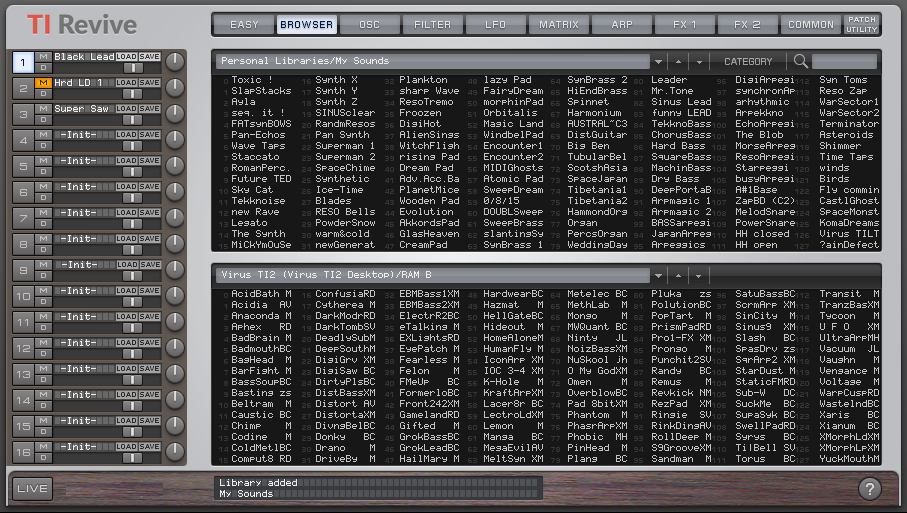
Drag a library's .mid or .syx file from Explorer, Finder or your file manager onto one of the two browser panes (since 0.8.35, our own addition: the original takes no file drops). While you drag, the LCD says “Drop to add a library”. The file is copied into Personal Libraries (Access Music/Virus TI/Patches in your Documents folder), never over an existing file, and the pane you dropped it on shows it at once; a .syx is saved as a .mid so the original finds it too. Dropping the same library again only shows it. Tested on Linux (REAPER) and Windows 11 (VM, Ableton Live 11); not tested on macOS yet.

The browser after a drop: the upper pane shows the new library My Sounds, the LCD says Library added
A library dropped onto the upper browser pane (Linux). TI Revive ships no Access files; it draws this look at runtime from the skin in your own Access installer. Not affiliated with Access Music or Kemper.

Section locking

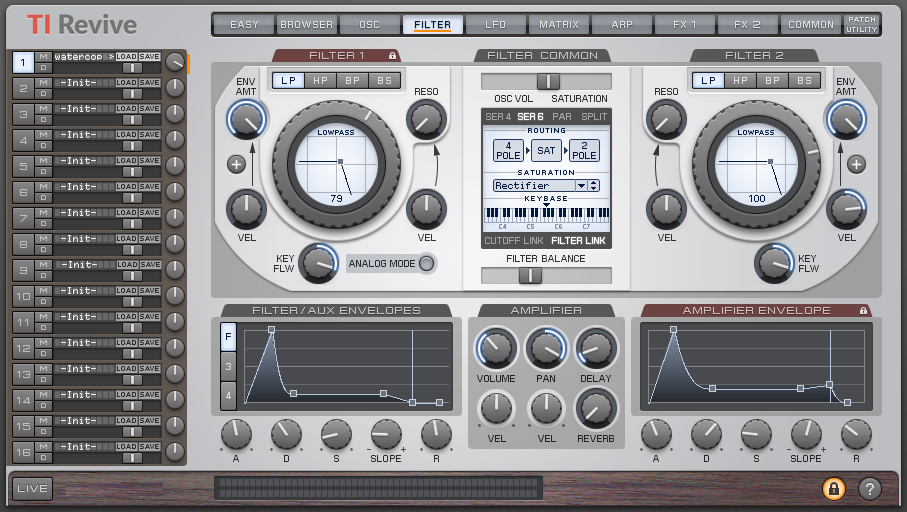
Like in the original (since 0.8.36, issue #21): double-click a section's header to lock it for the selected part (the header turns red, the page tab and the part get an orange mark), double-click again to unlock it. A locked section keeps its settings when you load another patch, from the browser or on the Virus. Right-click a header for more: lock or unlock all sections of the part, unlock all parts, and presets that lock one page (OSC, Filter, LFO, Matrix, Arpeggiator, FX). Settings outside the sections, such as Transpose and Key Mode on the COMMON page, still come from the new patch, as in the original. Locks are not saved with the project, also like the original. Tested on Linux (REAPER), Windows 11 (VM, Ableton Live 11) and macOS (Ableton Live 12).

The FILTER page with Filter 1 and the Amplifier Envelope locked: red headers with a padlock, an orange mark on the tab and part 1, a padlock next to the ?
Two locked sections on the FILTER page (Linux). TI Revive ships no Access files; it draws this look at runtime from the skin in your own Access installer. Not affiliated with Access Music or Kemper.

Undo, Redo, Compare and Randomize

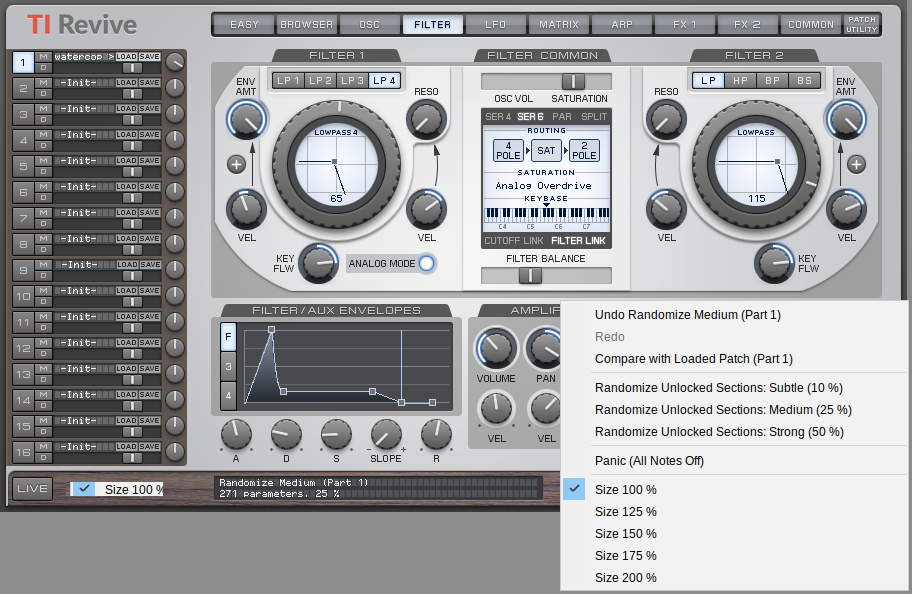
Our own additions since 0.8.36, in the menu of a right-click where there is no control (next to the editor sizes). Undo and Redo take back your edits in the editor and patch loads into a part; a knob turn is one step, and Ctrl+Z / Ctrl+Shift+Z (Cmd on the Mac) work while the editor has the keyboard. The steps last for the session. Edits of the linked controls (FX switches, link buttons, LFO clock menus) are not in Undo yet. Compare switches the selected part between your edit and the patch as you loaded it, and back; an edit or a load while comparing ends it, and Undo brings your edit back. Randomize changes the selected part's sections by up to 10, 25 or 50 % of each value's range and sends one patch to the Virus; it is one Undo step. Locked sections stay as they are (lock what you want to keep), and so do Transpose, Key Mode, the patch volume, the input and vocoder settings and the arpeggiator. Tested on Linux (REAPER), Windows 11 (VM, Ableton Live 11) and macOS (Ableton Live 12).

The right-click menu after Randomize Medium: Undo Randomize Medium (Part 1), Compare, the three Randomize amounts, Panic and the editor sizes; the LCD shows 271 parameters, 25 %
The right-click menu after Randomize (Linux). TI Revive ships no Access files; it draws this look at runtime from the skin in your own Access installer. Not affiliated with Access Music or Kemper.

Help mode

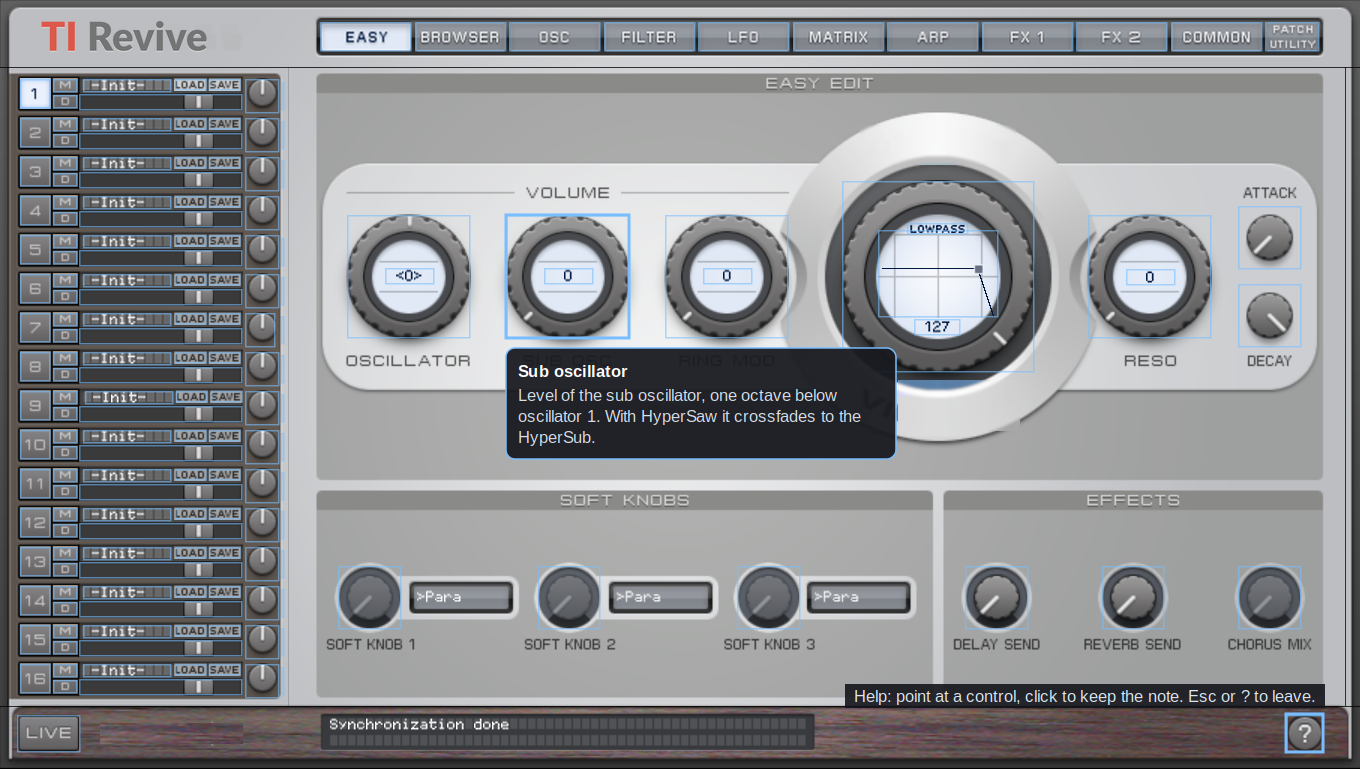
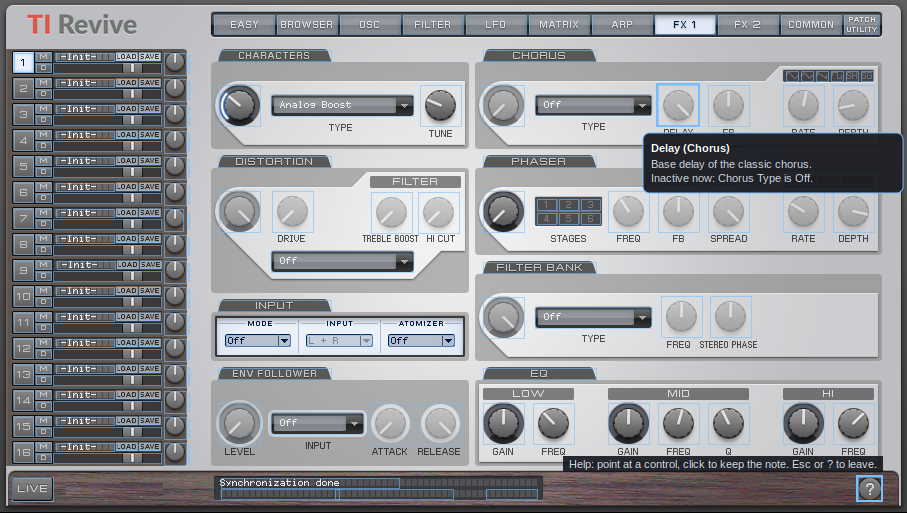
Click the ? at the bottom right of the editor and choose Explain the Controls: every control gets a short note on what it does. Point at a control to read it, click to keep its note on screen: it stays while you point at other controls, whose notes show on top (since 0.8.36), and the filter and envelope displays have their own notes. Clicks do not change values in this mode, and the page tabs still work. Esc or ? ends it. The notes are written for TI Revive, not taken from the Access manual. A greyed-out control says why, for example “Inactive now: Chorus Type is Off.” or “depends on Input Mode, Input Atomizer.”

The plug-in's help mode: a note explains the sub oscillator knob
Help mode. TI Revive ships no Access files; it draws this look at runtime from the skin in your own Access installer. Not affiliated with Access Music or Kemper.
A help note on the greyed-out chorus delay knob: Inactive now, Chorus Type is Off
Help note on a greyed-out control. TI Revive ships no Access files; it draws this look at runtime from the skin in your own Access installer. Not affiliated with Access Music or Kemper.
The ? menu: Explain the Controls, website, Report a Problem, Save Logs, Detailed Log, Panic
The ? menu (Linux). TI Revive ships no Access files; it draws this look at runtime from the skin in your own Access installer. Not affiliated with Access Music or Kemper.

Timing

The plug-in finds the clock of the Virus on USB, stamps every note against it and reports its latency, so the DAW lines recordings up with the grid. Since 0.8.39 that delay follows your buffer down to 32 samples, as the original's does (3584 samples plus the buffer: 76 ms at 64 samples and 48 kHz, before 82.7 ms), and notes you play live skip it in DAWs that mark them (Ableton Live), about 22 ms. Since 0.8.41 "Lower latency (experimental)" on the Control Center's Options page shortens that delay to 36 to 48 ms at buffers up to 256 (55 to 59 ms at 512); it leaves your DAW only about 20 ms, so switch it off if notes come late. If you record a part you play into Ableton Live, switch the plug-in's Live Mode on while you record: otherwise Live puts the take about 50 ms later than you heard it (measured on macOS with Live 12; the original's VST3 can also tell Live only one latency). Played notes can come 1 to 3 ms late now and then (the original stamps them the same way); "Even rhythm for played notes" on the Control Center's Options page (since 0.8.41) plays them about 3 ms later, so they come at most about 1.3 ms late (measured on a Mac). The Virus follows the host at 44.1 or 48 kHz like with the original (since 0.8.32); at other host rates a resampler converts with -90 dB error.

16th notes at 120 BPMOn the gridJitterDrift
Linux, REAPER (0.8.27)63 / 630.16 ms-72 ppm
macOS, Ableton 12 (M3, 0.8.31)256 / 2560.01 ms0 ppm
Windows 11 PC, Ableton Live 11 (0.8.23)480 / 4800.04 ms0 ppm
Windows 11 PC, Ableton Live 11 (0.8.24)256 / 2560.33 ms-1 ppm
Classic plug-in 0.7.xfirst late, second missing0.06 msn/a

Recorded from the USB audio of the Virus and measured by onset analysis. Jitter is the standard deviation.

CPU and audio thread

The audio thread never allocates memory or waits for a lock; note-offs always get a slot, so no note hangs.

Before (0.7.x)Now
Idle, Virus connected5 %1.4 %
Stress test: 16 channels of notes + 32 automated parameters19 %2.9 %
One audio block, 3 LFOs automating the Virus for 40 minn/amax 122 µs, 0 dropouts

Checked with ThreadSanitizer and AddressSanitizer; 848 unit tests run with every release build on Windows and Linux.

Editor speed

Only the controls that change are redrawn, the backgrounds of recent pages are cached, and on Linux the images live on the X server.

BeforeNow
Full repaint on Linux~70 ms1–7 ms
One knob step~5 ms< 1 ms
First visit of a page27–52 ms10–13 ms

Problems found on the hardware

Behaviour of the Virus that is not documented anywhere, found by testing and, since 0.8.26, by reading its own firmware.

  • A flood of parameter changes can hang the audio of the Virus until it is switched off, and so did one extreme note flood in a test of ours. Automation is limited to 250 messages per second and merged per parameter; a 4-minute full-load test passes.
  • The Virus releases every sounding note about a second after the last Active Sensing message it received. Since 0.8.26 the plug-in sends one every 300 ms, like the original; before, it sent one at the start only.
  • The Virus keeps time-stamped MIDI in a small buffer without an overflow check. Since 0.8.26 the plug-in keeps its time-stamped MIDI well under that buffer's limit; normal playing and automation never come near it.
  • When the Virus is busy for a moment, for example while you change a patch on its panel, it holds back what the computer sends. Since 0.8.26 the plug-in sends it again instead of dropping it, so a bank sync or patch dump no longer breaks.
  • Choosing a patch for one part no longer stops the other parts for a moment. Since 0.8.27 the plug-in sends the patch like the original: in small pieces on its own USB-MIDI cable, with the other parts' notes in between.
  • At every Play and loop restart the plug-in sends the song position like the original (since 0.8.27), so the arpeggiator and clock-synced LFOs restart on the beat.
  • A Virus switched on after the DAW no longer causes sync errors at every Play. Since 0.8.34 the plug-in also takes the Virus' sample rate when it starts the audio later; before, it kept counting 44.1 kHz while the Virus ran at 48 kHz.
  • On macOS, a Virus that streams at another sample rate than macOS reports (seen after a power cycle and after another DAW had used it) no longer causes sync errors without end. Since 0.8.35 the plug-in measures the rate the audio really arrives at and then switches the Virus over and back, as a sample rate change in the DAW does. That recovery has not been seen on a real Virus yet: on the fixed build the problem did not come back.
  • At host sample rates other than 44.1 kHz the first notes after Play and after a render no longer come late and catch up over several seconds (since 0.8.27).
  • The Virus drops the message right after a multi dump. The plug-in pauses after one, so new projects reset the synth reliably.
  • Bank sync requests make the Virus play its notes late. The sync pauses while you play and continues in the gaps.
  • Switch the Virus off and on, or replug it, while the DAW runs: the editor shows the original's “No Virus TI can be found” page meanwhile, then the plug-in waits until the Virus is ready and plays in time again. Two DAWs share it: one plays, the other waits and takes over. Linux: after a cable replug, or when the Virus is switched on while no DAW runs, it can come back without sound. Since 0.8.32 the plug-in tries to bring it back by itself (it switches the sample rate away and back, which the Virus cannot ignore); this could not be tested against the fault yet. If it stays silent, switch it off and on once while the DAW runs.

TI Revive Control Center

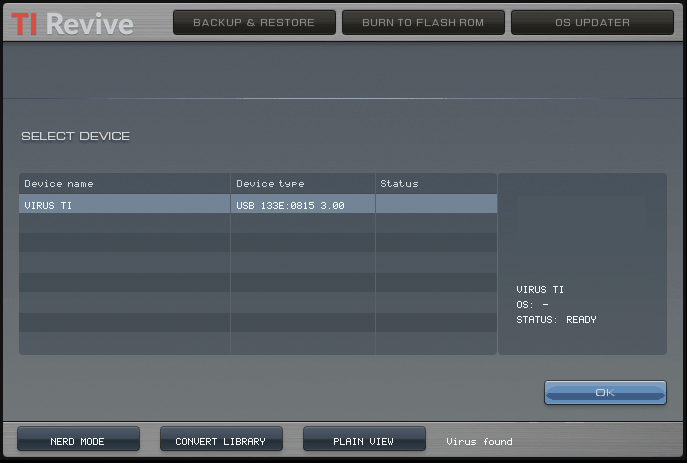
A separate app in the look of the Access Virus Control Center, when that is in your Access installer. It shows the connected Virus and its RAM banks, backs them up as patch libraries, restores a bank from such a backup and converts libraries between .mid and .syx. A restore (since 0.8.30) writes only the programs that differ, into the Virus' RAM, and reads each one back; unlike Access' Control Center it never writes the Virus' flash.

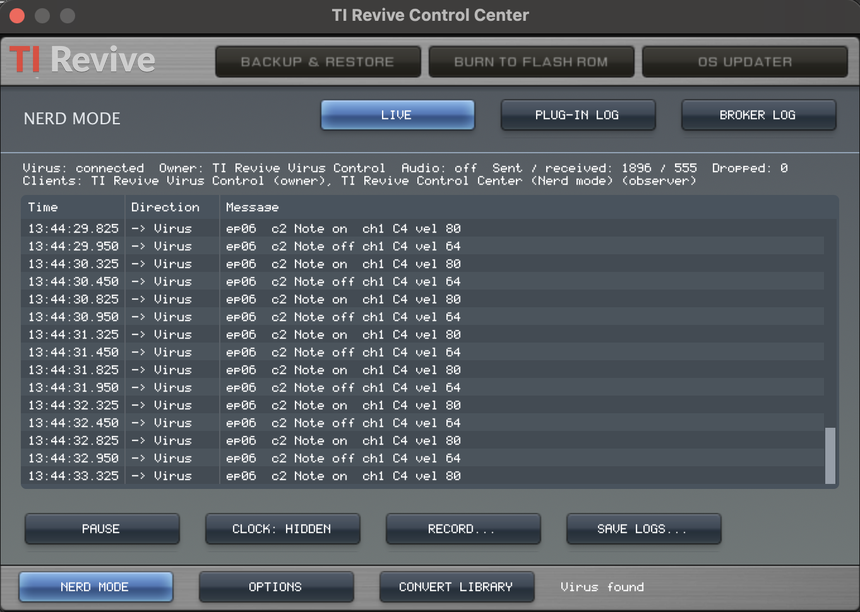
TI Revive Control Center: the device, backups and Nerd mode
The Control Center in the Access look. TI Revive does not offer Burn To Flash ROM and OS updates; since 0.8.43 their buttons are gone. TI Revive ships no Access files; it draws this look at runtime from the skin in your own Access installer. Not affiliated with Access Music or Kemper.

Nerd mode

Shows live what goes between TI Revive and the Virus, decoded: notes, parameter changes by name, dumps, the bank sync. It lists which programs use the Virus, shows the plug-in's and the broker's logs, and saves them all for a bug report in one file. Since 0.8.42 Nerd mode, the Options page and the RAM banks (on BACKUP & RESTORE) are pages of the Access look, with a scrolling table and the plug-in log's switch on the Options page; the plain window is only used when the Access files are missing. It only watches; it never sends anything to the Virus. Its Options page (since 0.8.41; also View > Options) switches the plug-in's options: lower latency (experimental), the restart of scrambled audio, notes played live skipping the delay (on by default since 0.8.39), even rhythm for played notes, the plug-in log (on by default since 0.8.41), the update check (since 0.8.42, off by default: once a day, when the Control Center opens, it asks GitHub for the newest release, with nothing about you or your setup; the plug-in itself never goes online, it shows a note once and a Download entry in its ? menu), a Virus TI Snow setting (since 0.8.42, off by default, macOS and Linux: after a quiet second TI Revive's service asks an idle Snow every 4 ms instead of every 1 ms, for less CPU; the first MIDI message after a pause can then come up to 3 ms later), and two switches for comparisons with the original (the output delays only on change instead of at every Play/Stop, the timing as before 0.8.35). A change applies from the next start of the plug-in; the update check runs at once and the Snow setting within a few seconds.

Nerd mode in the Access look: the notes the plug-in sends to the Virus, decoded live
Nerd mode in the Access look (0.8.42): the notes the plug-in sends to the Virus, decoded live. TI Revive ships no Access files; it draws this look at runtime from the skin in your own Access installer. Not affiliated with Access Music or Kemper.

What TI Revive will not do

On purpose.

  • No firmware or OS updates for the Virus, no “Burn To Flash”, no factory reset. Anything that writes to the flash memory of the Virus can brick it.
  • No Access files in TI Revive: the skin, the parameter descriptions and the ROM banks come from the installer you own.
  • No telemetry: TI Revive never connects to the internet. Its parts talk to each other on your computer only, and the logs stay there.

What is tested where

We test on a Virus TI2 Desktop. For other models, systems and DAWs we depend on test reports from their owners.

ModelWindowsmacOSLinux
TI2 Desktoptestedtestedtested
TI Snowno report yetworks for users one report, with problems
Polarno report yetworks for users (e.g. Logic Pro 13, macOS 26.4.1; FL Studio 26.1.7, macOS 15) no report yet
Desktop (TI1), Keyboardno report yetworks for users no report yet
  • The installers are not signed, so Windows and macOS ask once before they run them.
  • On Windows 10 and Windows 11 before 25H2 the keys of a Keyboard or Polar cannot be recorded in a DAW. On macOS (since 0.8.38), Linux and Windows 11 25H2 or later (since 0.8.42) they can, through the MIDI input “TI Revive Synth” (on macOS by user reports; on Linux and Windows not yet tested with keys, our Desktop has none). The plug-in switches Local off, as the original does; without that input the keys and wheels are silent until you set Local to On in CONFIG on the Virus.
  • On macOS the Virus' audio can have dropouts after the Mac wakes from sleep: macOS's USB audio can leave it with gaps until the Virus is plugged in again. Since 0.8.39 the plug-in then reconnects the Virus by itself, at most once a minute. If dropouts remain after waking, unplug and replug the Virus.
  • On Linux a Keyboard or Polar can stay silent on its own keys after the DAW closes: the Linux kernel's USB audio driver links the Virus to the computer each time it takes the device (when it is plugged in, after a reset, and when TI Revive gives it back), so the keys keep going to USB. TI Revive unlinks it at the close like the original driver; the kernel links it again. Unplugging the USB cable brings the keys back. Seen with a simulated Virus through the real Linux kernel (E527); not checked on a real Keyboard.
  • Dense projects: with three heavy patches (Main LD, Hrd LD 1, Super Saw) on three channels some notes are lost; any two of them play cleanly. The original Virus Control loses the same notes on the same Virus, so this is the Virus' own limit, not TI Revive's.

Automated tests

848 unit tests run with every release build on Windows and Linux. They covered 95.5 % of the lines of the core library when last measured, on 19 Nov 2026, with fewer tests than today: the USB protocol, the device access, the editor and the reader for the Access files.

On the synth

Changes that touch the Virus are tried on our TI2 Desktop before a release; the release notes say on which systems and in which DAWs.

Your reports

The soft knobs (0.8.7, 0.8.8), the third USB output (0.8.9), knobs on the Virus in Ableton's Configure mode (0.8.29) the missing mod matrix destinations (0.8.30), and the Snow on Linux, the MIDI input on macOS and the driver removal (0.8.38) came from users' reports. Bug reports and test reports from other setups show us what to fix next.

Recent releases

New names (the plug-in is now "TI Revive"), the Control Center without the Burn and OS Updater buttons, and a new home for the project

  • New names. The plug-in is "TI Revive" (before "TI Revive Virus Control"), the Windows ASIO driver "TI Revive Audio" (before "TI Revive Virus Audio") and the MIDI inputs "TI Revive Synth" and "TI Revive MIDI" ...
  • Control Center: the Burn To Flash ROM and OS Updater buttons are gone. TI Revive never offered these functions (they write the Virus' flash); before, they only said so.
  • Not affiliated: the plug-in's welcome and What's New pages say at the bottom that TI Revive is not affiliated with or endorsed by Access Music or Kemper.

Several Viruses at once, Virus knobs as Logic automation with the window closed, the Control Center's pages in the Access look, an opt-in update check, MIDI inputs on Linux and Windows

  • Several Viruses at once (#45). Each Virus gets its own TI Revive service, numbered by the USB port it is plugged into (Virus 1, Virus 2, ...), and each plug-in instance takes a free Virus: the one its project was ...
  • Knobs turned on the Virus are recorded as automation in Logic also with the plug-in window closed (#30). Before, Logic got them only while the window was open (Ableton Live recorded them anyway). Tested on our ...
  • Control Center: Nerd mode, the Options and the RAM banks (now on BACKUP & RESTORE) are pages of the Access look; the PLAIN VIEW button is gone (the plain window stays for a setup without the Access files). Nerd ...

Lower latency as an experimental option; an Options page in the Control Center; the plug-in restarts scrambled Virus audio by itself and tells you when the Virus stops sending audio; macOS: the installer refuses systems older than 14.4; the plug-in log is on by default for easier bug reports; the Virus display shows the sync like the original, and the plug-in names each patch as it syncs; the arpeggiator follows a count-in and the beat like with the original; on the TI Snow the plug-in's level meters work; scrambled Virus audio is restarted on macOS too; on a Mac, notes you play keep their rhythm; macOS: the Virus' MIDI In as a second MIDI input; a Virus Keyboard or Polar plays its own keys again after the DAW closes

  • Lower latency, experimental (#30): a new option on the Control Center's Options page, off by default. At audio buffers up to 256 a note takes 36 to 48 ms instead of 76 to 87 ms (44.1 kHz: 39.2 / 43.5 / 47.9 ms at ...
  • Arpeggiator with a count-in (#30): when your DAW counts in before recording, the Virus' arpeggiator and clock-synced LFOs now run in time with the bar, as with the original. Before, the plug-in told the Virus ...
  • TI Snow: the level meters in the plug-in work (#30). On the Snow they stayed empty: its window draws each part's meter as a thin bar of its own, which the plug-in never filled. Now it shows each part's note ...

Every version Release feed (Atom) On GitHub: Watch › Custom › Releases

Help and support

“Virus TI not connected”

Only one driver can use the USB interfaces of the Virus. Old Access drivers, or third-party ones like the driver of another Virus editor, take them first. Disable the other driver and restart; on macOS the setup script offers to park the known ones.

Connected, but no sound

The Virus decides per part where its sound goes. Switch the part's output to “Out 1” and back to “USB 1” in the plug-in to send the setting again. On macOS also check that your DAW may use the microphone. On Linux, if notes and knobs work but no audio comes over USB, connect the Virus directly to the computer, not through a USB hub.

Three separate outputs (USB 3)

PATCH UTILITY › Preferences › “Input and Output Configuration” = “3 Outs / No Input”. Then a part's output can be “USB3 L+R” and its sound comes out of the plug-in's Out 3. In Ableton: an audio track with Audio From = the Virus track, Out 3, Monitor In. In Logic: insert the plug-in as Multi-Output, set “3 Outs / No Input”, and add the extra channel strips with the + in the Mixer. Checked on rc3 with a TI2 Desktop and the Audio Unit, by ear and Logic's meters; not on a Snow.

Process audio through the Virus (sidechain input)

Like the original, the plug-in can send audio from your DAW into the Virus: set “Input and Output Configuration” to “3 Outs / 1 Input”, and on the FX 1 page set a part's Input Mode to Static (always on) or Dynamic (played with notes) and Select to L + R. Then send an audio track to the plug-in's sidechain input; the part's filters and effects process it. In REAPER, give the Virus track 4 channels and send the audio to channels 3/4 (check in the pin connector that they feed Sidechain 1/2). In Ableton Live, pick the audio track in the device's Sidechain section. In this mode the Virus does not work as a sound card for your computer. Tested on Linux (REAPER), macOS (Ableton Live 12) and Windows 11 (Ableton Live, in a VM and on a real PC).

Projects bring back every patch setting

Older versions saved the parts in a format the Virus converts itself, and it reset about 20 newer settings on loading: Input Mode, unison, arpeggiator mode, chorus type, envelopes 3 and 4 and more. Projects now keep the current format (0.8.18); older projects are converted when they open, and settings that never reached the Virus open as the Virus played them. A new project's chorus shows “Classic”: that is what the Virus makes of the original's Init patch.

When the Virus is missing

Switched off or unplugged, the editor shows the original's “No Virus TI can be found” page and the page tabs are locked, as in the original. The page goes away by itself when the Virus is back. Do not follow its advice to hold ARP EDIT while switching the Virus on; TI Revive does not need that.

Export and freeze without a workaround

The original refused offline rendering, so you had to find your DAW's real-time render setting or record the Virus live. TI Revive supports it: when your DAW renders offline (export, freeze, offline bounce), the plug-in holds each block until the Virus has made its sound. The render is right, but not faster than the song: the Virus plays in real time. Right after a project opens, the render first waits a few seconds for the Virus.

REAPER on Linux: stay in REAPER while a render runs

REAPER 7.82 on Linux can crash right after a render from the render dialog if another program had the focus when the render window closed, for example when you clicked into a terminal or a browser during the render. Two short freezes in the same tests were probably the same bug (not measured). This is a bug in REAPER's window layer, not in TI Revive: it happens with REAPER's own ReaSynth as well, without TI Revive in the project. Until Cockos fixes it, stay in REAPER until the render window has closed.

REAPER: a part's volume jumps to the maximum at Stop

If your MIDI items contain volume controllers (CC 7, as many imported MIDI files do at the start), REAPER's Reset MIDI CC/Pitch to neutral on playback stop sends CC 7 = 127 when you stop, and the Virus turns it into part volume 127; Play brings the item's value back. TI Revive passes every controller on, like the original's VST2. To keep the volume, enter cc7=-1 under Preferences > Audio > Playback > CC reset overrides, or switch the reset on stop off (the override is tested with REAPER 7.83 on Linux).

“A sync error occurred. Press Stop and Play to clear.”

Like the original, the editor shows this when the Virus reports several notes in a row that arrived too late for their time stamp while your DAW plays. Stop and Play clears it. If it comes back, use a USB port the Virus does not share with other devices; the original gives the same advice. On macOS, notes could come late after an export in 0.8.25 and 0.8.26; since 0.8.27 the plug-in fills the audio cycles Core Audio skips during an export. In 0.8.30 a few notes of an export at a small buffer size (128 samples) still came 3-6 ms late and the message appeared; fixed in 0.8.31 (an export at 48 kHz and 128 samples: 256 of 256 notes on the grid).

The first notes after Play are late

The plug-in sends notes slightly ahead to make up for the USB round trip, so start playback a little before the first note. The original driver did the same.

Report a problem

If your question is not answered above, open a report on GitHub. Reports are read by the developer, and the answer comes in the same thread; it is a hobby project, so it can take a day or two.

  1. Collect the logs. Easiest: open the TI Revive Control Center, switch on Nerd mode and press the Save logs... button. You get the plug-in and broker logs in one file, without your home folder or user name. Or by hand: take diag.log from the plug-in's folder (the log is on by default since 0.8.41; with 0.8.40 or older create an empty file diag.on there first and reproduce the problem):
    Windows%LOCALAPPDATA%\virus-ti-native macOS~/Library/Application Support/virus-ti-native Linux~/.local/share/virus-ti-native
  2. Open a bug report. The form asks for your system, Virus model, the TI Revive and DAW versions, and what happened. Drag the log files into it.
  3. Everything works? A test report helps as much as a bug report, above all for the Snow, Polar and Keyboard, and DAWs we have not tried.

You need a free GitHub account to post. Look through the logs before you attach them and remove anything you consider private. Existing reports: all issues.
Contributing

The repository is prepared for working on it with an AI coding assistant.

For AI assistants

AGENTS.md gives any assistant the rules and a map of the repository: no Access material in the code, never risk the synth, evidence before claims, and say exactly what was tested.

Skills

Step-by-step guides in .claude/skills: test your setup safely and write a report, find the cause of a problem in the logs, and prepare a pull request the way we review it. They are plain text, so they work without an assistant too.

Without code

Test reports, reports about problems in the original, and help with reading someone's logs are as useful as pull requests.

How to contribute Open the repository

Why

The Access drivers stopped working on current systems. TI Revive is free and open source.

How it was built

By working out the USB protocol and the original software's behaviour from logs, captures and analysis, and by testing on real hardware. Much of the work was done with an AI coding assistant; the tests on the synth are done by hand.